ECS GF8200A (NVIDIA GeForce 8200) with integrated graphics
Author:
Date: 03.08.2008 |
|
Layout and Features
Apart from them chipsets, the major distinction between the boards is in their form factors. In particular, abit A-N68SV is made in the Micro-ATX format, while the ECS board - in the full-fledged ATX.
Engineers at abit have provided only two 240-pin DIMM slots each for DDR2 memory modules, with the overall supported memory capacity being 4 GB. On the contrary, the ECS board uses for slots for DDR2 and therefore the overall memory capacity may be as much as 8 GB.
As we already said, two slots are quite enough for the average value system, however, four slots allow for a more flexible configuration of memory modules and a more optimum use of cheap 512 MB modules.
Then, both the motherboards offer the integrated GeForce graphic core and allow for using an external video card which is installed into the PCI Express x16 slot.
The configuration of the remaining ports is as follows: the abit board uses two PCI and one PCI Express x1 slots. The large dimensions of the ECS board allowed the engineers to fit three PCI and two PCI Express x1 slots. We also note that to cool the chipset both the motherboards use only an aluminum radiator. Although the dimensions of the radiator on the ECS board are much larger, the ratings for the cooling system are the same because these boards use different chipsets.
The expansion options of the GeForce 8200 chipset are superior to the 7025. In practice, this results in a superiority of the ECS board at the number of SerialATA links. There are six links: five ports are located near the chipset, with one more brought over to the rear panel. On the abit board, all the four ports are positioned near the chipset.
A similar situation is with the number of USB ports. The abit motherboard supports ten USB2.0 ports: four of them are installed on the rear panel, with 6 more ports plugged in with brackets (missing in the package bundle). There are six additional ports on the ECS board (the required brackets are also missing in the package bundle). However, there are six ports on its rear panel (12 altogether), which is more convenient.
Both the motherboards implement the Intel High Definition Audio subsystem. On the other hand, the abit board supports six channels (ALC662 chip is used), while the ECS board - eight (IDT 92HD206XX5 chip).
Now a few words on the network support: the abit board uses the RTL8101B chip made by Realtek (10/100 Mbit), and the ECS - RTL8111B (10/100/1000 Mbit) made by the same company:
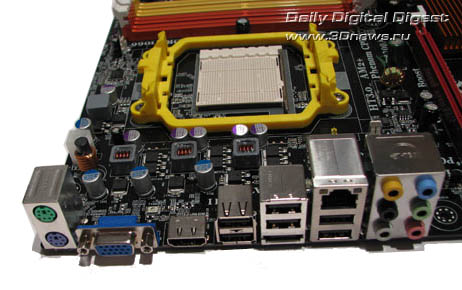
The board's rear panel is of the following configuration:
We note that the boards lack both COM ports and the one LPT port. On the abit board, they are missing completely, and the ECS board supports only one COM port implemented with a bracket (missing in the bundle). There are also differences in the number of outputs of the integrated graphic core. The abit board uses VGA and DVI, and on the ECS product - a standard VGA and more up-to-date HDMI. Besides, one SerialATA port is brought over to the rear panel of the ECS port. And lastly: since the abit board uses a much cheaper audio subsystem, there are only three audio outputs on the rear panel versus six on the ECS board.
Here is a traditional diagram of the boards (we found only a diagram for the abit board):
Of the traits of the product, we note the Power and Reset buttons installed on ECS GF8200A.
Now on to the BIOS settings.
 |
Content: |
 |
|
|
Top Stories: |
|
 |
|
MoBo:
|
|
|
|
VGA Card:
|
|
|
|
CPU & Memory:
|
|
|