ASUS notebooks with ATI Mobility Radeon X600 and X700 graphics

Author:
Date: 24.11.2005
|
|
These days, more and more notebooks able to replace the huge and poorly portable Desktop Computer are emerging and offer better communication features, on par at performance. Unfortunately, far not all of them will be easy to carry around, especially in the public transport. Despite all the engineering survey, the major issue is weight. The 2.5-3 kg by specifications does not seem so much. But do not forget that you would have to carry the notebook in a bag, often with the PSU, disks, documentation and other personal belongings, which normally doubles the weight of the "hand-luggage". But, provided you have a vehicle of your own, all these problems vanish - just drop it into the passenger compartment and that's it, you can go wherever you like. Even if the problem with transportation is not so serious, there is one more interesting aspect - is the modern notebook really able replacing the huge CPU unit? Being enthusiastic about this topic, we took two accessible ASUS notebooks of the "Home & Business series" - V6 and M6 with discrete graphics (models V6X00V and M6Q00VA) and decided first to concentrate on their performance.
The choice of these models is dictated by the following two factors. First, these are not the most expensive systems, i.e. they are affordable to wide public. Secondly, you can view a detailed description of the appearance and usability features of these notebooks in our other materials (M6S00NE and V6000V), so we are not dwelling on that and are moving now to the tests. Well, here is a brief tour around the package bundle, usability, and specifications of the "guinea-pigs".
Specifications:
|
|
V6X00V
|
M6Q00VA
|
|
Chipset
|
Intel 915PM
|
Intel 915PM
|
|
Processor
|
Intel Pentium M Processor 760 (2 GHz), L2 2 MB, FSB 533 MHz
|
Intel Pentium M processor 760 (2.0 GHz) L2 2 MB FSB 533 MHz
|
|
RAM
|
512 MB DDR-II 533 MHz, expandable to 2 GB (2 SO-DIMM slots)
|
512 MB DDR-II 533 MHz, expandable to 2 GB (2 SO-DIMM slots)
|
|
Video Card
|
ATI Mobility Radeon X600, video memory 64 MB (128 MB with HyperMemory)
|
ATI Mobility Radeon X700; video memory 128 MB
|
|
HDD
|
Hitachi 80 GB, 5400 rpm, UDMA/100
|
Hitachi 80 GB, 5400 rpm, UDMA/100
|
|
Optical drive
|
MATSHITA DVD-Multi. DVD-R/RW: 8x/4x, DVD+R/RW 8x/4x, CD-R/RW 24x/10x, DVD-ROM: 8x, CD-ROM: 24x
|
MATSHITA DVD-Multi. DVD-R/RW: 8x/4x, DVD+R/RW 8x/4x, CD-R/RW 24x/10x, DVD-ROM: 8x, CD-ROM: 24x
|
|
Network
|
Marvel Yukon 10/100/1000 Mbit/s
|
Marvel Yukon 10/100/1000 Mbit/s
|
|
Wireless communication
|
Wi-Fi (IEEE 802.11b/g), Bluetooth V1.2, IrDA V1.1
|
Wi-Fi (IEEE 802.11b/g), Bluetooth V1.2, IrDA V1.1
|
|
Modem
|
AC’97 SoftV.92 Data Fax
|
HDAUDIO SoftV.92 Data Fax
|
|
Audio
|
Intel 82801FB ICH6 AC’97; integrated speakers and a microphone
|
Intel High Definition Audio; 4 integrated speakers, integrated microphone
|
|
Communication ports
|
4 x USB 2.0, IEEE1394, linear output for earphones, linear input for microphone, S/PDIF, VGA, RJ-11, RJ-45
|
4 x USB 2.0, IEEE1394, LPT (EPP, ECP), VGA, TV Out, RJ-11, RJ-45, S/PDIF, linear input for microphone, 68-pin connector for PortBar III
|
|
Card reader
|
SecureDigital, MultiMedia Card, MemoryStick, Memory Stick PRO
|
SecureDigital, MultiMedia Card, MemoryStick, Memory Stick PRO
|
|
Pointer
|
TouchPad, Logitech optical mouse in the bundle
|
TouchPad, Logitech optical mouse in the bundle
|
|
Indicators
|
Power-on/Suspend, Battery Charging/full/low, Storage device access, Capital / Scroll / Number Lock, E-mail in box, Wireless indicator, Touchpad Lock
|
Power-on/Suspend, Battery Charging/full/low, Storage device access, Capital Lock, Number Lock, E-mail in box, Wireless indicator, Audio DJ Activity
|
|
Display
|
15" (38.1 cm) Glare SXGA (1400 x 1050)
|
15.4" (39.1 cm), Color Shine & Crystal Shine WXGA (1280 x 800)
|
|
PSU
|
Included in the package bundle (Delta SADP-65KB) 100-240 V, 50/60 Hz, 19V, 3.42А Power 65 W
|
Included in the package bundle (Delta ADP-90FB) 100-240 V, 50/60 Hz, 19V, 4.74А Power 90 W
|
|
Power
|
4800 mA*hr (Li-Ion battery)
|
4800 mA*hr (Li-Ion battery)
|
|
Size
|
331 x 30 x 272 mm
|
354 x 34 x 273 mm
|
|
Weight
|
2.49 kg
|
2.6 kg
|
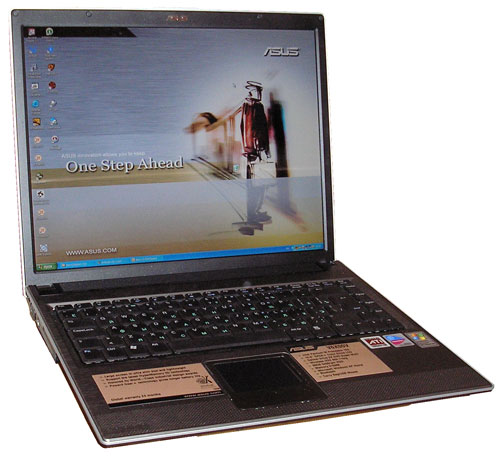
ASUS V6X00V
Package bundle:
- PSU (19V, 3.42А);
- PSU cord;
- RJ11 cord (for modem);
- Logitech optical mouse with a USB extension cord;
- User's Manual (in Russian);
- Drivers CD;
- CDs: Nero Burning ROM, Power Director , ASUS DVD, Media@Show;
- ASUS Recovery (2 pcs);
- 4800 mA*hr battery;
- Case for the notebook;
- Nylon bag to carry the notebook around.
Exterior and usability
This notebook is very attractive, delicate and thin to look at. Its tint is black-grey-silver. All the surfaces are of mat color, nice to touch, and not slippery, which allows holding it more confidently without leaving ugly fingerprints. The housing is made of light metal alloy, which imparts rigidity to the structure. On the upper lid, there are four smart bright blue LEDs (power, network, or battery, Bluetooth, Wi-Fi), with the remaining indication hidden inside.
On the left panel, there is the optical drive DVD-Multi, a PCMCIA slot, an infrared port, an IEEE 1394 connector, a connector to plug in an external monitor, and a Kensington security lock socket.
To the right, there are four ports: USB 2.0, Ricosh card reader, audio connectors to plug in earphones and a microphone (if the integrated one is not suitable at quality), as well as RJ-11 and RJ-45 sockets to plug in a modem and the hardwire network. The power supply adapter is also connected over here.
On the front and rear panels of the housing, there are no connectors. This is very convenient for work at home or in the office, but is not always of convenience in the journey because it's just the lateral panels which are held most often. On the other hand, you don't have to use the hardwire interfaces or plug in other devices on the go.
The notebook offers a full-sized keyboard. On the black keys, there are Russian and English characters. We had no claims as to the positioning of letter, numeric and control keys. They are easy to press, with almost no sound. The TouchPad that has a scroll bar is sensitive enough, and areas around it serve as a good а support for the wrists.
The screen which is slightly edged in black offers the standard 4:3 relation of sides, but the resolution is not standard - 1400х1050. With that high resolution, some screen items seem a bit too tiny, and to make the work more comfortable we had to increase the speed of the pointer movement (with the standard settings, its transposition from corner to corner took a triple run over the TouchPad).
Technical features
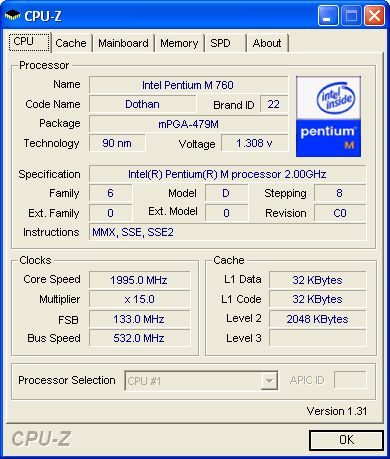
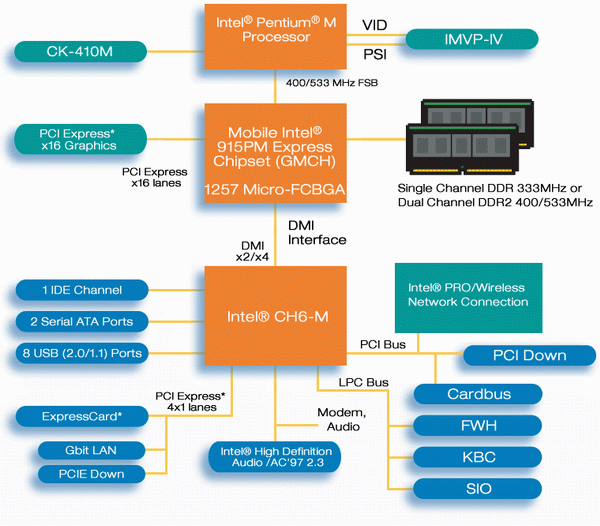
The notebook is based on the Intel Centrino Sonoma platform which includes Intel Pentium M 760 processor, the Intel Alviso 915PM chipset, and the wireless network adapter Intel Pro/Wireless 2200BG.
The processor is built on the base of the Dothan core, offers 2 MB L2 cache size, operating clock speed 2000 MHz, and uses the 533 MHz system bus speed.
The chipset Alviso 915PM offers support for all the advanced technologies and allows the manufacturer to manipulate the price and performance of the assembled system. To reduce the price, Intel Celeron M with the bus speed 400 MHz and DDR-333 memory can be used. Besides, there is support for SATA hard disks.
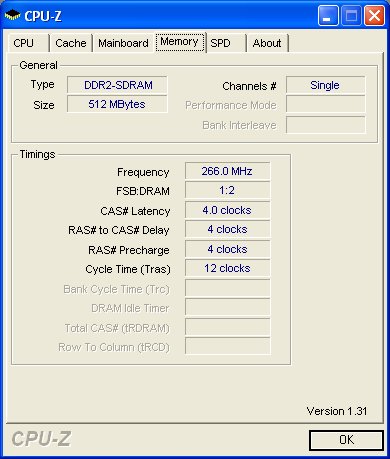
Certainly, because regular DDR is inappropriate for Intel Pentium M, so DDR-2 is used although unfortunately in the single-channel mode provided by the single 512 MB module made by Infineon (64T64020HDL3.7A).
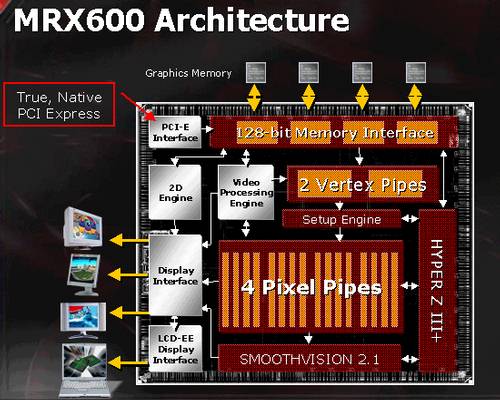
The notebook uses a discrete video card - the ATI Mobility Radeon X600 (M24) chip having 64 MB DDR video memory expandable up to 128 MB using the HyperMemory at the expense of the system memory. This chip is fully compatible to DirectX 9.0, offers 4 pixel pipelines and two vertex ones, supports SMARTSHADER 2.0, SMOOTHVISION 2.1, HYPER Z III+, LTRC (LCD Time Response Compensation) that reduces the effect of the matrix's response time on the image quality, as well as special mobile technologies PowerPlay 5.0 and Vari-Bright that control the power consumption of the chip and the matrix's brightness. The graphic processor itself runs at 400 MHz, and the memory at 500 MHz thus reducing these parameters to 200 and 360 MHz respectively when battery-operated.
Once we are talking about the video system, a few words on the matrix as well. The manufacturer proudly declares the diagonal size and the default resolution in the specifications. Behind the scene are the viewing angle and the response time, as well as the Glare, mysterious to many. In fact, the Glare is a special coating of the matrix that creates the effect of a glassy monitor (sometimes it is mentioned that the matrix is made on a special glassy substrate). Such coating allows producing better viewing angles and much deeper black color, that is, the enhance the contrast ratio. Besides, coating like this makes the screen look more effective. The other side of using this coating is enhanced reflectivity of the matrix, especially on the "deepened" black background, which is not very comfortable (sometimes you have to choose the place for work for quite a while to have the screen not reflect anything). The screen of V6X00V offers superb horizontal viewing angles, but the vertical ones might have been better greater. Especially annoying was the sharp clearing of the image upon looking a bit upwards - that requires regular tuning the turning angle of the notebook lid while changing the run position. Besides, over the bottom edge of the screen a distinct glare of the matrix with backlight is vividly seen. But we were delighted about the response time. Unfortunately, we were unable to measure this parameter and it was not there in the specifications, although subjectively it seemed to be 16-12 ms. On dynamic images the smearing effect was almost invisible (unless you peer into, it's not seen at all).
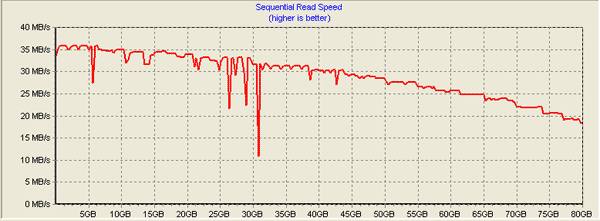
Now coming back to the interior of V6X00V, let's look at the disk subsystem. The notebook uses the Hitachi Travelstar 5K100 (HTS541080G9AT00) hard disk of 80 GB capacity and 8 MB cache, with the spindle rotational speed 5400 RPM. The hard disk uses the PATA UDMA 100 interface. Its operating performance was taken with HD-Tach software.
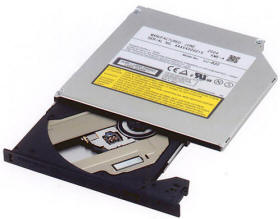
The average seek time is 16.6 ms (minimum - 5.5 ms), average time of reading from plates is 29 MB/s, with the peak buffer read speed being 92.2 MB/s. The processor usage by disk operations did not exceed 1%. These characteristics are sufficient for a mobile hard disk but they loose to the mid-sized hard disk of 3.5" form factor, with the spindle rotational speed 7200 rpm. As the optical drive, DVD-RAM Panasonic-MATSHITA UJ-822S recently out of production.
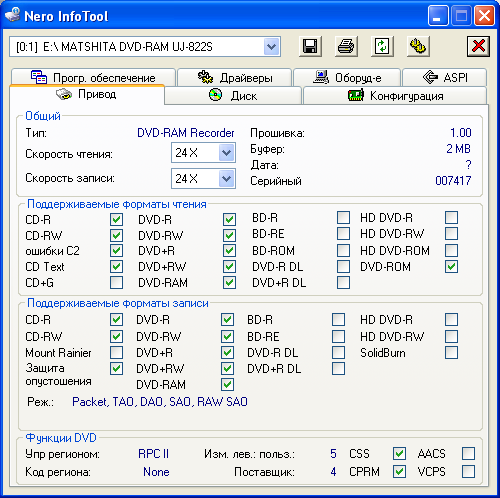
We verified the drive capabilities using the Nero InfoTools.
Judging by this information, the drive operates with all the popular media types, which is not as fast as we wanted but enough for a mobile device. The drive is not multi-zoned, i.e. RPC 2 is used.
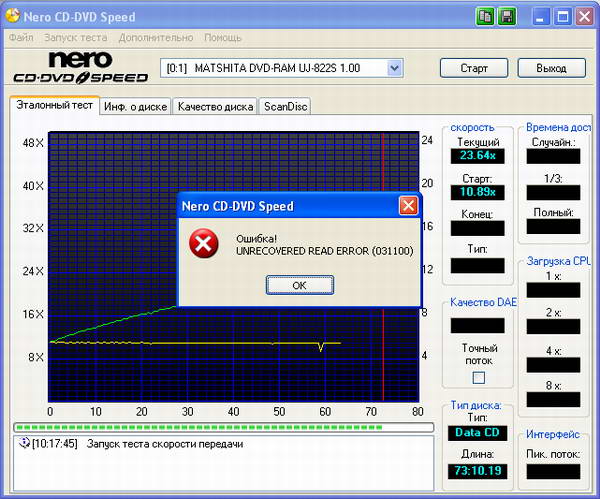
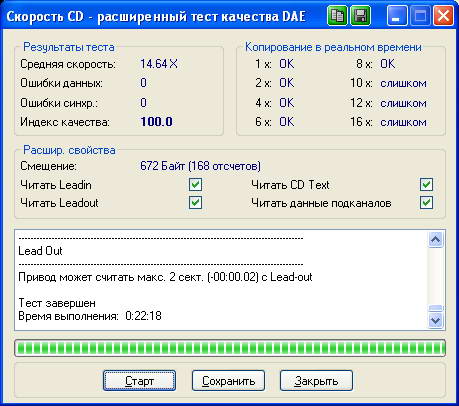
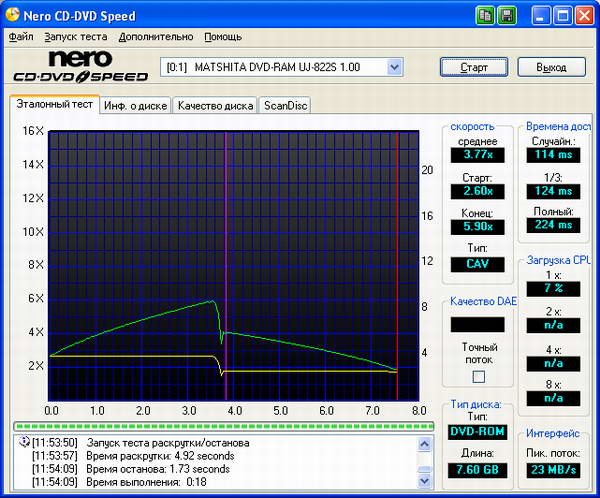
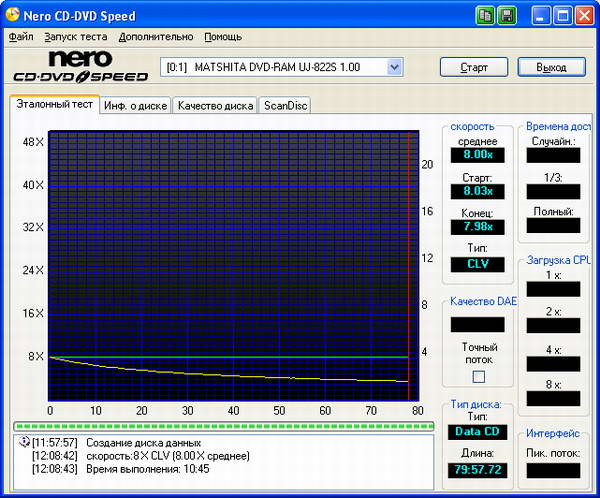
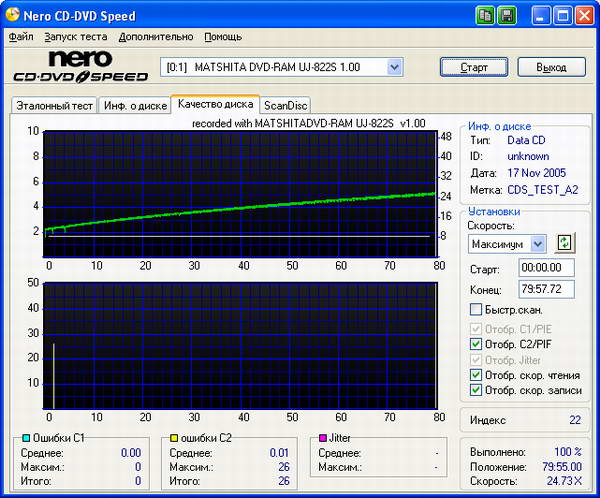
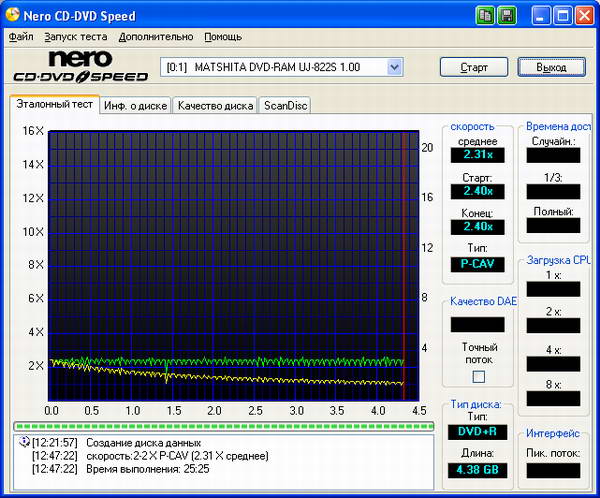
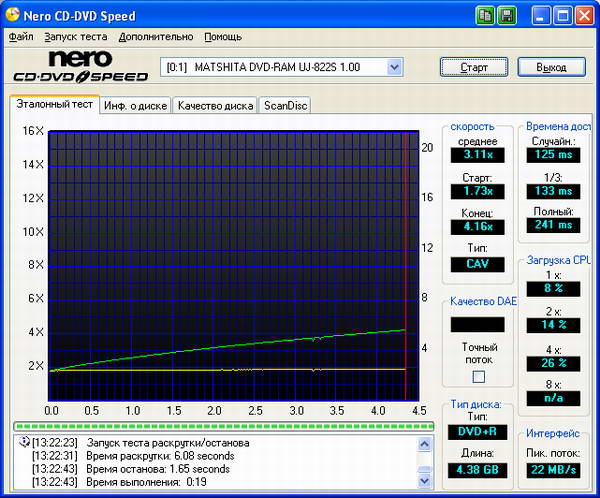
Since the optical drive takes an active part in the data exchange, we decided to test it a bit. For that, we read CD and DVD disks of not the best quality with it, verified the capability of copying Audio-CD and wrote a couple of matrices (CD-R and DVD+R).
The drive failed to cope with the scratched CD-R matrix.
On the other hand, it showed superb grabbing performance both at quality and capability, but for the lack of high speed.
Despite being far not fresh, the DVD-Video disk read fine.
We were able to write the Acme CD-R matrix certified as 52x only at the 8x speed.
Even with that, the recording quality can be regarded as satisfactory.
Also without haste we recorded the Acme DVD+R 8x disk
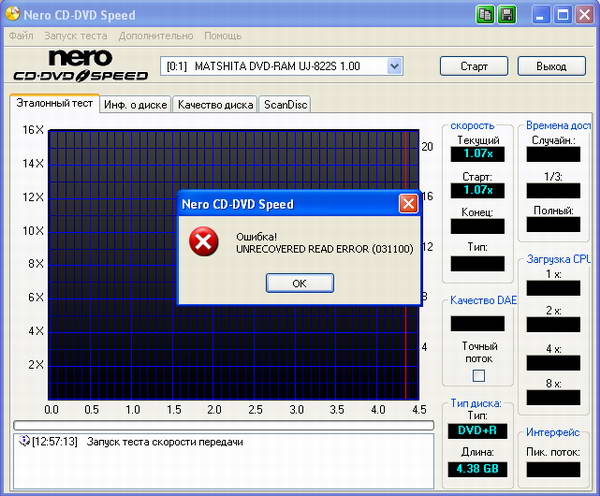
But the result proved unpleasant...
To be sure, we repeated the experiment. After the second try we succeeded in producing a good result.
Summary
The drive is modern enough, although during operation it can be one of the noisiest system component. On the other hand, it offers good operating performance, but you'd better spend some extra for good-quality media.
The audio system of the notebook is made up of the software codec Intel 82801FB AC'97 and two speakers. The low characteristics of this system are caused by small capabilities of the codec and low power of the speakers. The sound offers almost no low frequencies and proved strongly directional, although the sound volume is enough. It was not of much pleasure listening to the music and watching videos though. What saves the day is only connection of the acoustic system.
Heating and cooling
During operation, especially when executing demanding tasks, the right-hand part heats up immensely, but the cooling system does its job well without any noise. The vent holes in the bottom of the housing are in the center, thus they are not easy to block even if you put the notebook on your lap.
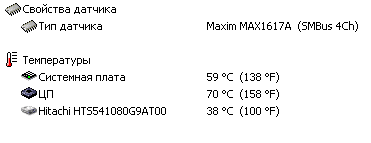
Processor proved to be the hottest part. It can be heated up with games or other resource-intensive applications up to 70-71 degrees centigrade (the screenshot was taken immediately on quitting 3DMark'03).
Power
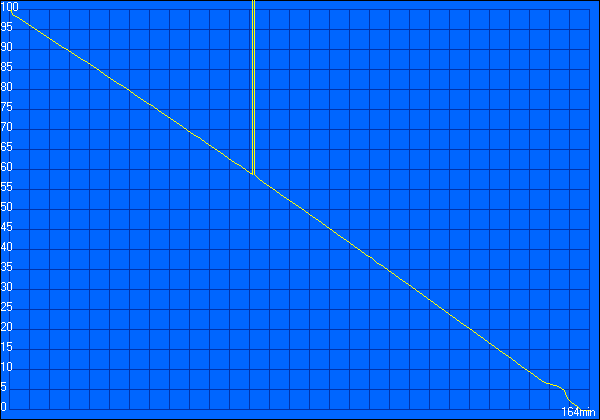
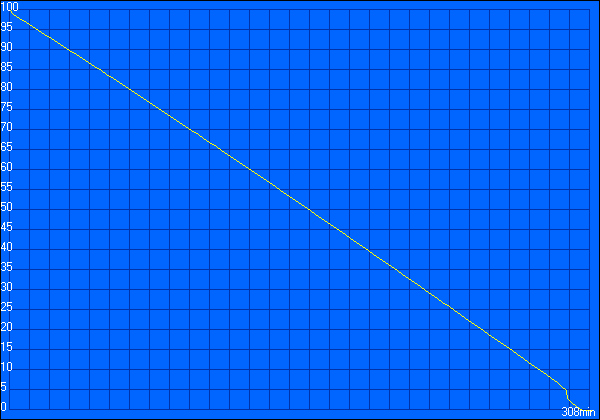
In its stationary state, V6X00V is operated from the power supply adapter Delta SADP-65KB (19V, 3.42A) which remains warm for all the time. The standalone operation is provided by a 4800 mA* hr Li-Ion battery. This margin of power is enough for 2 hrs 44 min of operation in the mode of maximum load or for a bit more than 5 hrs in the power saving mode. That is confirmed by the graphs produced with Battery Eater '05 v.2.51.
Discharge under maximum load.
Discharge in the power-saving mode.
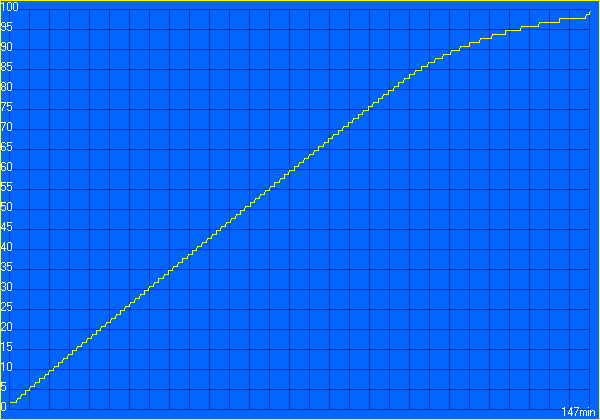
It takes two and a half hours for the battery to restore.
Prior to talking about the performance, let's look at the rival.
Next
 |
Content: |
 |
|
|
Top Stories: |
|
 |
|
MoBo:
|
|
|
|
VGA Card:
|
|
|
|
CPU & Memory:
|
|
|