
All you need to know about your products!




 |
 |
|
3DNews Vendor Reference English Resource - All you need to know about your products! |
|
||||
|
|
|
||||
|
|
|
||||
|
|
|
||||
|
||||||
Roundup tests of motherboards aimed at Intel Core 2 Duo processorsAuthor:Date: 09/07/2007 Today, we are updating the roundup tests of motherboards aimed at Intel Core 2 Duo processors which were fist published half a year ago. What has changed since then? Fist, Intel has released its 3rd series of chipsets which now includes 7 new products (integrated G31, G33, G35, mainstream P35, high-end X38, and the business chipsets Q33 and Q35). The most interesting of them are P35 and X38, but first products based on X38 will appear only by the end of this year, and P35 in combination with ICH9(R) is more likely a stage in evolution, rather than revolution. See for yourselves: first performance tests of P35 with DDR-3 memory demonstrate no performance boost as compared to P965 + DDR-2, and the price of DDR-3 memory is prohibitive. Regarding the support for 1333 MHz system bus, we can say that it is small step forward. Some reviewers have already questioned the performance boost of these processors. For now, we can't tell anything specific, since we haven't yet run respective tests. But in any case, processors with the 1333 MHz bus offer support for most of high-end motherboards aimed at P965! A few words on NVIDIA chipsets. The release of nForce 6xx series has made it possible for manufacturers to produce respective motherboards which by their specifications are on par with those based on Intel chipsets. Before the release of this series, NVIDIA chipsets were anyway popular but they hardly overclocked. The nForce 6xx series has no issue like that - most boards equipped with both high-end (680i SLI) and low-end (650i SLI) chipsets can easily cope with the FSB speed as high as 500 MHz. Besides, NVIDIA chipsets offer the two advantages: they normally support 1 ParallelATA line more than competitor products do. Secondly, they support the SLI technology. Unless NVIDIA enables support for the SLI in the Intel X38 chipset, the nForce 6xx series will be beyond any competition at that! A couple of hints as to how to read this review. The text is long enough (30 motherboards), so the most important information is presented in the table of specifications and in the conclusions. Note that the newest motherboards are highlighted in bold type in the table, with the description of each at the end of the pages, and a reference to a complete and detailed review of the motherboard. As we already stated, almost every new review starts with a mention of Intel Core 2 Duo processors. That is understandable because the release of Intel's new architecture is a mini revolution that brings CPU over to a new level of performance and power consumption. It's just these specifications that resulted in that almost all the PC enthusiasts somehow or other are planning for migration to a new platform (or have already migrated to it). Therefore, an important issue of choosing the right motherboard aimed at Core 2 Duo comes up. It should be noted that all the motherboards of the previous generation are incompatible to new processors (although they are of LGA775 Socket). And it is neither the developers nor chipsets that are to blame for this situation, but it is a result of the fact that the motherboards were developed before receiving the Core 2 Duo specifications. Therefore, the power supply module of these chipsets does not allow using Conroe processors (a module meeting the VRM 11 specification requirements is required). In other words, all the previous motherboards based on i975X and NVIDIA nForce4 SLI Intel Edition chipsets, however good they are, are being sent to the garbage heap of computer history. And we (users) start choosing new motherboards. For now, there exist motherboards with support for Core 2 Duo based on Intel 975X and P965 chipsets, as well as NVIDIA nForce4 SLI IE, nForce 570/590 SLI IE, and nForce 680i SLI/650i SLI. Besides, it should be noted that part of the manufacturers have released motherboards based on outdated chipsets of the i945P series with the VRM11 power supply module. However, these boards are aimed solely at the value sector of the market, that is, where AMD Athlon64 CPUs still rule. From the viewpoint of PC enthusiasts, they are of little appeal. On the other hand, with the release of cheap Intel E2160 and E2140 based on the Core architecture, we can no longer assert AMD's domination in the value sector. ChipsetsLet's talk in a bit more detail about the chipsets P965, 975X, and NVIDIA nForce4 Intel Edition, nForce 570/590 SLI, as well as the new nForce 6xx series. To start with, look at the comparative specifications table.
As we can see from the table, the expansion options of the 680i SLI chipset are on par with 590 SLI. The same can be said about the functionality: the kit of NVIDIA proprietary technologies is the same as before. In particular, all the chipsets of the nForce 6xx series support the MediaShield (including RAID Morphing and Cross-Controller RAID), FirstPacket, LinkBoost, and SLI-Ready Memory, as well as the nTune Utility. Besides, the nForce 680i SLI chipset supports the DualNet (+ TCP/IP Acceleration) technology. For details of these technologies, read the review on nForce 5xx series chipsets. This table requires some comments to accentuate some fundamental distinctions of the chipsets. First, despite the official specifications of memory frequencies, motherboard manufacturers have implemented a complete set of memory frequency multipliers in their products (using some technical tricks). In the end, motherboards based on i975X/P965 offer a really wide selection of multipliers (including support for DDR2-1066 memory): 
Available memory frequencies on ASUS P5W-DH Deluxe (i975X)
While we are talking about memory, let's outline a very important point: the chipset i975X offers support for the reducing multiplier (DDR2-400) for FSB = 266 MHz, i.e. the memory frequency = 3:4 of the FSB speed, which allows for a substantial overclocking of Core 2 Duo processors while keeping the memory frequency within the reasonable limits. Example: at FSB = 533 MHz the memory frequency will be 400 MHz, which is equivalent to DDR2-800. It is not by accident that I specified such a high frequency. The thing is, Core 2 Duo runs at relatively low frequencies (the clock speed of E6300 = 1.86 GHz), and the system bus speed is as high as 266 MHz (1066QPB). Therefore, the multipliers of Conroe and Allendale processors are within 7 to 10. In view of the technology limit of the 65-nm process of Core 2 Duo = 3.5 GHz, the operating frequencies of the overclocked system will be within 400 to 500 MHz (E6300: 500 MHz x 7 = 3500 MHz). The chipset P965 does not have a reducing multiplier for the memory frequency. That is, it loses to i975X at that. However, the differences in the design and process technology (P965 is made following the "finer" process technology) resulted in higher overclocking capability of P965! We also note here that to attain high results the user would have to raise voltage on the north bridge (both for P965 and 975X). However, the chipsets P965 and 975X are not direct competitors and are aimed at different market sectors. P965 is used to manufacture middle-end and high-end motherboards, and i975X - only for high-end products. The key distinction between these chipsets is support for the ATI Crossfire (or AMD/ATI Crossfire) technology. In particular, 975X-based motherboards do support it, and with two PCI Express x16 slots they allocate 8 bus lanes to each. The chipset P965 lacks such functionality, however, some motherboards do have 2 PCI Express x16 slots each onboard. At the same time, for the first slot 16 lanes are allocated, whereas for the second slot - 2 or 4. In autumn 2006, the situation radically changed: ATI was acquired by AMD, and the latter enabled support for the Crossfire on P965. Respective amendments were introduced to Catalyst 6.9 (and further) drivers. In the end, users of P965-based motherboards with two PCI Express x16 slots will leverage the advantages of two ATI video cards running in the Crossfire mode. At the same time, it should be noted that performance boost will be lower than in the same video cards installed on an i975X-based motherboard. In fact, if we disregard the Crossfire technology, the presence of two PCI Express x16 slots allows plugging in four monitors to a single system. As regards the SLI technology, Intel's chipsets do not support it (although that is quite possible using unofficial modified drivers). Therefore, if the user is up to merging two video cards into an SLI, he would need a motherboard based on any nForce chipset with support for SLI. By the way, overclocking of motherboards based on nForce 6xx series chipsets is very simple and is not accompanied by a synchronous rise in the memory frequency. The user simply fixes the memory frequency and then builds up the FSB speed. The next radical distinction between 975X- and P965-based motherboards is in different south bridges. Motherboards based on 975? use ICH7(R), whereas those based on P965 user newer ICH8(R). Nevertheless, the new is not always the best. Although the number of USB 2.0 ports has been increased (to 10) in the south bridge ICH8(R), with the number of Serial ATA channels increased to 6, the support for Parallel ATA has gone, unfortunately. Therefore, users of such hard disks will not be able easily upgrading the motherboard. Most users are using PATA CD and DVD drives. Anyway, motherboard manufacturers have found a way out of the trouble and started installing cheap additional controllers (even Intel does that on its boards). Therefore, all who are after the direct support for Parallel ATA should forget about P965 and choose between motherboards based on 975X and nForce4 chipsets. A few words on the integrated G965 chipset. That is a modification of the chipset P965 with integrated graphic core X3000 (Intel GMA X3000). Let's dissuade you from buying motherboards based on this chipset: the raw graphic drivers are the cause of low performance in 3D applications (somewhere as the level between i915G and i945G), and the middling 2D quality is simply tiring to the eyes. Roundup table
In this table, the asterisk * stands for some specific feature or a record value. abit AW9D-MAXThis motherboard is another high-end product of the MAX series. Originally, the MAX concept implied giving up all outdated standards, but the first products were not accepted by users. A couple of years afterwards, the lack of LPT and COM ports on the rear panel is no longer a shock to the buyers.  In general, AW9D-MAX is a typical high-end motherboard based on the i975X chipset. In particular, it supports the Crossfire (two PCI Express x16 slots), has two PCI Express x1 slots onboard, and one "regular" PCI.  It should be noted that the audio subsystem of the board is implemented as a separate smaller board which is inserted into a dedicated slot.  To plug in hard disks, there is one Parallel ATA connector and 8 Serial ATA II connectors (one of which is external). To support additional SATA channels, there are two RAID controllers Silicon Image Sil3132 onboard. Besides, there are two Gigabit LAN controllers Realtek RTL8111B, as well as a Firewire controller - TSB43AB22A - made by Texas Instruments (both ports being external). The motherboard also supports 8 USB 2.0 ports. 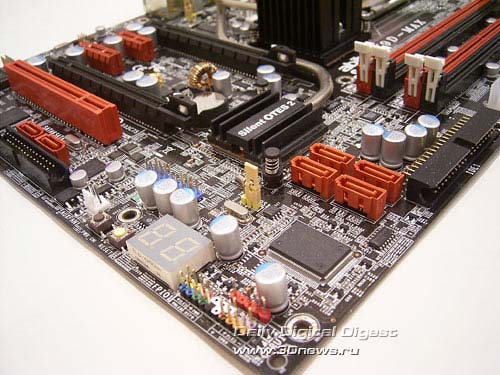 On the board's rear panel, there are 4 USB 2.0 ports, a couple of RJ-45 network connectors, and one Serial ATA II port. The remaining ports are plugged in with brackets. The empty space and the "bare" radiator suggest the thought that something was forgotten during installation. In our view, over here there will be one or two fans, but this modification of the OTES technology will relate to the Fatal1ty series.  The board's package bundle looks vague: we received an almost "bare" engineering sample, and the information from the official web site does not disclose any details. Anyway, all the standard components can be made available at any retail store and we are much more interested in the functional capabilities of the motherboards. Here we have to point to some shortcomings. First, the motherboard does not operate with Core 2 Quad processors based on the Kentsfield core. Secondly, the board does not support the reducing DDRII-400 memory multiplier for processors of 266 MHz FSB speed (QPB 1066 MHz). Because it just offers the major advantage of i975X over P965. The memory settings section itself is not abundant with the number of timings - there are only the most generic:  On the other hand, the system monitoring section is the most powerful among all the motherboards with support for Core 2 Duo processors:  The motherboard monitors the temperature of the CPU, system and that from the four(!) sensors of the power supply module. Besides, the board allows detecting the rotational speed of all the eight(!) fans which can be plugged in to the system. Moreover, you can assign signals of deceleration or stoppage to every fan, as well as enable the function of system power-off in case the fan has stopped. At the same time, the rotational speed of all the eight fans can be made dependent on various temperatures using the FanEQ utility (there is a respective Windows utility). Now on to the overclocking tools. The respective BIOS menu item is called "OC Guru" (formerly named "SoftMenu").  Therefore, abit AW9D-MAX allows the user to adjust the FSB speed within 200 to 600 MHz, raising voltages on the CPU - up to 1.65 V, on the memory - up to 2.65 V, and on the chipset - up to 2.0 V . As regards the practical overclocking, the motherboard showed high results - 450 MHz (with a CPU E6400). Among the additional features, we should mention a 7-stage POST indicator, OTES - a cooler for the power supply module, and a few additional LEDs on the reverse side of the board:  And of course we note an additional mGuru chip. Owing to that, the board acquired advanced capabilities like maintaining profiles of BIOS settings, monitoring the rotational speeds of the fans, and a very powerful section to do with system monitoring.  An interim conclusion - the motherboard abit AW9D-MAX is a good product based on i975X, but far not the best. Chasing for additional features and increase of expansion capabilities have not left any time for polishing overclocking features. The shortcomings are about the lack of a reducing multiplier of the memory frequency, as well as some issues of compatibility to memory modules. It's just for the powerful overclocking that abit motherboards have been popular among enthusiasts. However, if engineers at Abit succeed in overcoming the overclocking issues and release a new BIOS with better results at that, the board will rightfully take its place of dignity among the best motherboards for PC enthusiasts. But for now we can ascertain that abit AW9D-MAX is strong "middling" in the good sense, and the traits like support for 5" mGuru Panel, mGuru chip and additional OTES cooling system cannot change this conclusion. Among the advantages of the board, we should note the superb exterior (owing to a lot of additional LEDs), a very powerful section of system monitoring. Among the shortcomings to note, there are flaws in the software. Pros:
For a detailed review, see abit AW9D-MAX abit AB9 ProAnother motherboard by abit, this time based on the P965 chipset. Note that the expansion options are well over the chipset's specifications. In particular, engineers of the company have expanded the functionality through installation of additional Serial ATA/RAID controllers, one of which supports one Parallel ATA controller.  The PCB design is convenient enough from the viewpoint of the assembly operator, except the inconvenient positioning of the Parallel ATA connector.  Let's list the expansion options: one PCI Express x16, two PCI Express x1, and two regular PCI slots. Besides, the board has two Gigabit LAN controllers, integrated 8-channel audio based on the ALC882D codec, 10 (!) SerialATA II channels, and 10 USB2.0 ports. Besides, the board uses the Firewire controller.  The rear panel is of nonstandard configuration: missing are COM ports, as well as an LPT port.  The board offers a couple of traits. First, it supports connection of a special 5" mGuru panel.  There is also an additional mGuru chip with which the feature of BIOS settings profile is implemented, and control over the fans' rotational speed, as well as very powerful system monitoring section.  Finally, the board uses a 7-stage POST indicator. 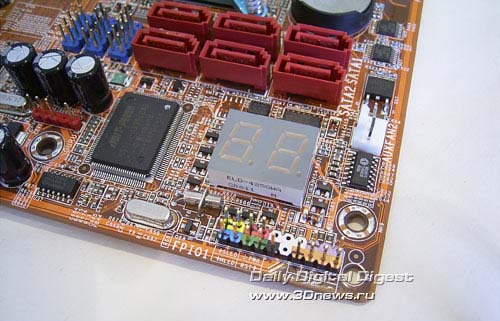 As regards the overclocking tools, they are powerful enough: the board allows adjusting the FSB speed within 133 to 600 MHz, raising voltage on the CPU up to 1.65 V, and up to 2.3 V on the memory, up to 1.45 V on the chipset, and up to 1.7 V on the south bridge.  As regards the actual overclocking, we note that with one of the first BIOS versions the board was able to attain 346 MHz (for a CPU E6700 based on the Conroe core, this can't be called a good result). With the latest BIOS version (1.5 of 19 Oct 2006), the overclocking was not possible at all (the board was hardly running at the nominal frequencies). Having rolled back to BIOS version 1.4, we reinstated the stable operation and attained the maximum FSB = 406 MHz. However, we can't praise programmers at abit: it is not possible to adjust the CPU multiplier, the voltage on the CPU is adjustable in a too large increment (which is unacceptable for overclocking Core 2 Duo). And if we set the memory voltage (Vmem) above 2.0 V, the board itself resets the value back to 2.0 V. I wonder how I should use Corsair Dominator modules (or similar) which require 2.4 V?? Within this roundup, we updated the BIOS to version 1.8 dated 18/05/2007 and unfortunately found no improvements. The board still runs stably at 400-410 MHz, and if the frequency goes beyond that the frequencies automatically reset the FSB speed to 410 MHz. The ranges of voltage adjustment and the increment have not changed. Setting the random access memory on abit AB9 Pro has been implemented at the level of a middling motherboard for the average common user. 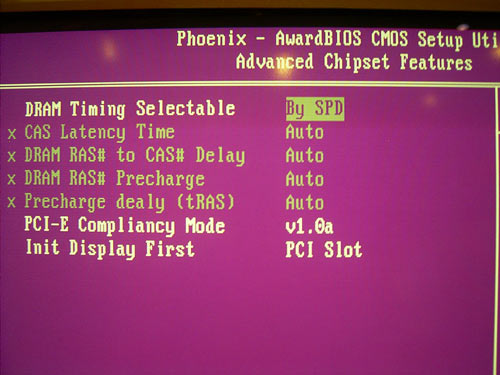 On the other hand, the system monitoring section is impressive for the abundance of features, and at that this motherboard is among the best.  Interim conclusion: abit AB9 Pro is a regular motherboard based on the P965 chipset, whose major advantage is the powerful expansion options and advanced system monitoring tools. But the overclocking let us down - the board can be hardly recommended to PC enthusiasts. Pros:
For a detailed review, read abit AB9 Pro ASUS P5W-DH DeluxeThe management of ASUS have proved far-sighted and concentrated substantial resources for the development of a series of motherboards based on the chipset i975X. Some models built on this chipset are aimed at professional workstations, and some of them - at home users. P5W-DH Deluxe is aimed just at the home users. In particular, it uses a system for PC remote control, which makes the ease of using the PC closer to the ease of controlling the household appliances. Besides, we should note the powerful expansion options which include a WiFi module. We should also mention the rich package bundle and quite interesting proprietary technologies (like Music Alarm, CrashFree BIOS 3, etc.).  We start with listing the expansion options at which ASUS P5W-DH Deluxe is among the leaders: two Gigabit LAN controllers, two Firewire ports, a WiFi module, and two Serial ATA/RAID controllers.  The remaining parameters are close to standard: 8 USB2.0 ports, 8-channel audio, two PCI Express x16 slots, two PCI Express x1, and three PCI slots. 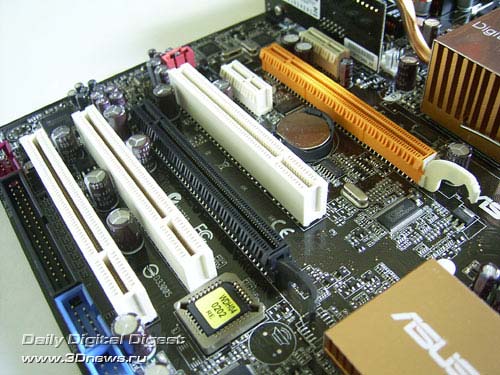 Note that support for two PCI Express x16 slots allows using AMD/ATI Crossfire, and additional RAID controllers allow plugging in up to 11 hard disks (9 over SATA II and 2 over PATA). Besides, the WiFi module allows setting up a home-based network:  The board is specific in that it lacks LPT and one of COM ports on the rear panel. Besides, on the panel there is one SATA and a Firewire ports (as a single block).  At the functional specifications, the board also has no bottlenecks either. In particular, the board can boast excellent compatibility to memory modules (although the list of accessible latency timings is not vast). However, it should be noted that some users have come up against the problem of starting up the system in the synchronous mode.  The system monitoring is powerful enough: the board displays the current temperatures for the CPU and the system, rotational speeds of all the five fans, as well as voltage levels. Besides, all the coolers are able adjusting the rotational speed depending on the CPU and system temperatures. For the CPU cooler there is a separate pack of settings for Q-FAN 2, and for coolers connected to PWR_FAN1, PWR_FAN2, CHA_FAN1 and CHA_FAN2 there are two common packs of settings.  The overclocking tools have no shortcomings at all:  ASUS P5W-DH Deluxe allows adjusting the FSB within 200 to 450 MHz, raising voltage on the CPU to 1.7 V, on the memory - to 2.4 V, on the north bridge - to 1.65 V and on the south bridge - to 1.2 V. It should be noted here that there is a new revision of the board which allows raising voltage on the north bridge to 1.85 V. No doubt, for a serious overclocking it is just this revision which is more preferable, but with our motherboard (of the older revision) we were able to attain a stable operation at the maximum possible FSB=450 MHz! Also, in view of the increased load (in the overclocking mode) upon the power supply module and the north bridge, the engineers at ASUS have implemented a rather powerful cooling system which allows for installation of an additional fan:   The price of the motherboard is rather high ($260-270), but the great number of the board's advantages let us safely recommend it for buying. There is one point, though: for a serious overclocking, you would have to look for a motherboard of new revision. Pros:
For a detailed review, see ASUS P5W-DH Deluxe ASUS P5W64-WS ProWhile P5W-DH Deluxe is one of the best motherboards for home-based users, the model ASUS P5W64-WS Pro is aimed at professionals. The board is also based on the i975X chipset, and its major feature is four PCI Express x16 slots. Installation of four video cards to the system allows plugging in up to 8 monitors, and PC enthusiasts can make use of the CrossFire technology, the ATI Physics technology (accelerator of physics computations), as well as one more video card for two additional monitors.  Let's list the expansion options: two Gigabit LAN controllers, two Firewire ports, an additional 4-channel Serial ATAII/RAID controller, 8 USB 2.0 ports, 8-channel audio, four PCI Express x16, and two PCI slots. 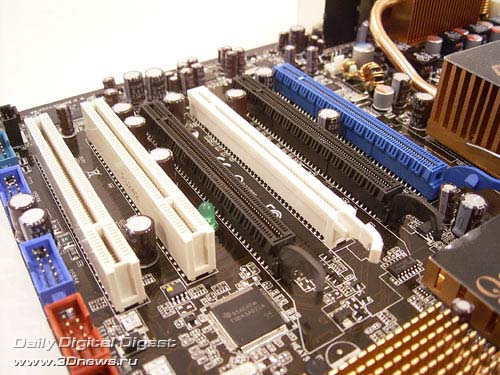 Coming back to the PCI Express slots, we note that the first and third slots are served by the i975X chipset, and in the Crossfire mode 8 PCI Express bus lines are allocated per each. Support for the second and fourth slots is provided by the additional IDT89HA0324 chip (PCI-Express hub). This chip is fitted between the north and south bridges of the chipset and is closed by a copper radiator with the "Quartet: logo.  The design of the rear panel is more or less traditional, except the missing COM ports (only one is supported - via a bracket).  ASUS P5W64-WS Pro uses a great number of proprietary functions and technologies, such as Q-Fan 2, MyLogo 2, EZ-Flash, CrashFree BIOS 3, MultiLanguages BIOS, C.P.R, AI Net, and AI Audio. We have already covered them in detail - it makes sense dwelling only on the CrashFree BIOS 3. The third version of the feature allows restoring the damaged BIOS not only from a diskette and a CD, but also from a flash disk. Besides, we note the OC Profile technology which allows saving all the BIOS settings into memory and loading them on demand. ASUS P5W64-WS Pro supports two independent profiles:  As for the board's BIOS, it is based on the AMI BIOS version.  The selection of memory settings is a bit wider than that for the P5W-DH Deluxe. But the system monitoring section is a bit weaker:  The board displays the current CPU temperatures (which are evidently overstated) and that of the system, rotational speeds of all the four fans, as well as voltage levels. Besides, the coolers plugged in to CPU_FAN and CHA_FAN1 can vary the rotational speeds depending on the CPU temperature with the Q-Fan 2 feature. The powerful overclocking tools will certainly appeal to overclockers:  The board allows adjusting the FSB speed within 200 to 550 MHz, raising voltage on the CPU to 1.7 V, on the memory - to 2.4 V, on the north bridge - to 1.8 V, on the south bridge - to 1.2 V, and on the FSB bus - to 1.5 V. Through practical overclocking we were able to attain stable operation at FSB = 470 MHz. Let me bring in a photo of noiseless system for cooling the chipset and the power supply module:  Heat from the chipset is sent to the main radiator (on the power supply module) using a heat pipe. Note that the system is noiseless only because an additional fan is missing in the package bundle. Therefore, ASUS P5W64-WS Pro is mainly aimed at professionals and users having 4 video cards in their systems. The overall set of expansion options, proprietary technologies and overclocking tools allows using it also for regular computers. But anyway this motherboard is a niche product, so the price >=$300 is quite adequate. Pros:
For a detailed review, see ASUS P5W64-WS Pro ASUS CommandoOn the moment of initial tests, this motherboard left some dubious impressions. On the one hand, we had no claims to the technical part: engineers at ASUS have created a very good motherboard based on P965. On the other hand, positioning of this motherboard seemed somehow strange to us: it falls within the "Republic of Gamers" series which is aimed solely at overclockers and computer enthusiasts. But the number of bonus items is too small, unfortunately. On the board there is an amusing highlight, three buttons, a LED screen, and that is all to boast. In the end, it loses to ASUS P5B Deluxe Wi-Fi at a number of parameters: there are fewer SerialATA links, no support for Wi-Fi, with no SoundMAX microphone in the box. At the same time, the Commando board costs about $40 as expensive. In any case, we already talked about that in a detailed review of this motherboard, but now we concentrate on only the technical aspects. First, the motherboard uses a massive cooling system based on heat pipes:  It offers support for two high-speed LAN controllers, has an additional Serial ATA II/Parallel ATA RAID controller JMB363 (only one Parallel ATA link is implemented), two Firewire ports, 10 USB 2.0 ports, and 8-channel integrated audio.  The board also uses two PCI Express x16, four PCI, and one PCI Express x1 slots.  The trait of the rear panel is in the complete lack of LPT and COM ports. Instead of them, there is a diagnostic LCD screen, optical and coaxial SP-DIF outputs, as well as a Firewire port.  The board demonstrated a perfect compatibility to various memory modules and quite a wide selection of available memory latency timings.  The system monitoring settings are superb:  The board displays the current temperatures for the CPU and the system, rotational speeds of all the eight fans, as well as voltage levels. The board also determines three temperatures from additional thermal sensors (unfortunately, missing in the package bundle). Depending on their readings, the board is able controlling the rotational speed of the fans plugged in to the OPT_FAN1-3 connectors. Implemented is also the OC Profile technology which allows saving all the BIOS settings into memory and loading them on demand. ASUS Commando supports two independent profiles:  Nor there are any claims to the overclocking tools.  In particular, the board allows adjusting the FSB speed within 100 to 650 MHz, raising the CPU voltage to 1.85 V , on the memory - to 3.375 V, as well as raising voltage on the north bridge to 2.025 V, on the south bridge - to 1.215 V, and on the FSB - to 1.55 V. In real overclocking, the motherboard showed the best results - a stable operation at FSB=520 MHz. Interim conclusion: although ASUS Commando costs more, it loses to its brethren at some specifications, but it offers a very important advantage - the overclocking tools are the most powerful among ASUS motherboards based on the P965 chipsets. Pros:
For a detailed review, see ASUS Commando ASUS P5B Premium Vista EditionIf you need the most "wired" motherboard and if you are not planning to use the SLI, then look at ASUS P5B Premium Vista Edition. One of the major advantages of this product is the package bundle which includes:
We spent a lot of time exploring additional devices, and on the whole we liked them (see the review New technologies in ASUS motherboards).  So, as in the case with Commando, we concentrate on the technical aspects only. First, we should note that in developing the motherboard there was used the PCB design of P5B Deluxe, which in many ways determined the similarity of specifications.  In particular, it offers support for two high-speed LAN controllers onboard, has an additional Serial ATA II/Parallel ATA RAID controller JMB363, two Firewire ports, 8 USB 2.0 ports, and 8-channel integrated audio.  Like on P5B Deluxe Wi-Fi, this motherboard supports only 8 USB 2.0 ports (whereas the south bridge ICH8R supports 10 ports). But on the Deluxe Wi-Fi version two ports have been sacrificed for the sake of installation of a Wi-Fi module, and on the Premium version - for installation of a flash memory module (ASAP technology).  The board also uses two PCI Express x16, three PCI, and one PCI Express x1 slots.  The trait of the rear panel is in the optical and coaxial SP-DIF outputs, one COM port, as well as a Firewire and SerialATA ports.  The board demonstrated a perfect compatibility to various memory modules and quite a wide selection of available memory latency timings.  The system monitoring settings are superb:  The board displays the current temperatures for the CPU and the system, rotational speeds of all the eight fans, as well as voltage levels. Both the motherboards display the current temperatures of the CPU and the system, and both offer the feature for adjusting the rotational speed of the CPU cooler depending on the CPU temperature. At other parameters, the ASUS boards takes a lead. The motherboard also monitors the rotational speed of 5 fans and is able dynamically adjusting the speed of three additional fans (using the Q-Fan 2 feature). Besides, the board offers the OC Profile technology which allows saving all the BIOS settings into memory and loading them on demand (supports 2 profiles).  The overclocking tools have been implemented at a high level.  In particular, the board allows adjusting the FSB speed within 100 to 650 MHz, raising the CPU voltage to 1.7 V , on the memory - to 2.45 V, as well as raising voltage on the north bridge to 1.65 V, on the south bridge - to 1.8 V, and on the FSB - to 1.45 V. In real overclocking, the motherboard showed quite decent results (with the latest BIOS version) - a stable operation at FSB=500 MHz. Interim conclusion: due to the rich package bundle, this board will certainly appeal to many PC enthusiasts. Pros:
For a detailed review, see ASUS P5B Premium Vista Edition ASUS P5B Deluxe Wi-FiThe specifications of ASUS P5B Deluxe allow it to compete almost on par with the best high-end motherboards based on i975P. However, the differences of P965 and i975X make these boards fall within different market sectors. Therefore, we can say that this board is aimed at a powerful average computer. ASUS P5B Deluxe looks more prestigiously due to the massive cooling system based on heat pipes:  At the expansion options, this motherboard is among the best products based on P965. It offers support for two high-speed LAN controllers, has an additional Serial ATA II/Parallel ATA RAID controller JMB363, two Firewire ports, 8 USB 2.0 ports, and 8-channel integrated audio.  Note that the number of USB 2.0 ports has been reduced from 10 to 8 at the expense of a WiFi module.  The board also uses two PCI Express x16, three PCI, and one PCI Express x1 slots.  The board's package bundle is rich enough and includes an additional fan for the power supply module, a dual microphone with the noise-suppression feature, as well as a Quick Connection Kit.  The rear panel features in that a Serial ATA II and a Firewire port have been brought over to it, with a LPT and one of the COM ports missing. The configuration of the panel is fully identical to that on ASUS P5W-DH Deluxe.  In terms of functionality, the board is rather powerful. Despite that the set of memory latency timings is practically standard, this motherboard demonstrated the best compatibility to memory modules. In particular, with Corsair Dominator modules the board was running absolutely stably at DDR2-1200 MHz memory frequency!  The system monitoring settings are standard:  The same can be said about overclocking tools.  In particular, the board allows adjusting the FSB speed within 200 to 650 MHz, raising the CPU voltage to 1.7 V , on the memory - to 2.45 V, as well as raising voltage on the north bridge to 1.65 V, on the south bridge - to 1.215 V, and on the FSB - to 1.45 V. In real overclocking, the motherboard showed the best results - a stable operation at FSB=520 MHz.  Interim conclusion: to date, ASUS P5B Deluxe is the most balanced product for Intel Core 2 Duo processors. We place a special emphasis on that at overclocking the motherboard has demonstrated the highest results! Pros:
For a detailed review, see ASUS P5B Deluxe ASUS P5B-EASUS P5B-E is a product of the middle pricing category (~$150). At the same time, the board offers a complete set of expansion options, supports powerful overclocking tools and offers an impressive list of ASUS' proprietary technologies. Let's dwell on the overclocking: after publication of a detailed review on this motherboard we received a lot of letters from readers who got interested in some features which lacked on the retail products. In particular: "... for instance, you can raise voltage on the memory to only 2.1 V, on the north and south bridges - you can't raise voltage at all", " On my 1.01G you can adjust voltage only on the memory, CPU, and the bus. No way to adjust voltage on the chipset! I used different BIOS but updated to version 0306 the way it was shown on your screenshot - didn't work, no voltage adjustment appeared.", "In the BIOS of my motherboard, there aren't the items NB Vcore, SB Vcore (SATA,PCIE), and ICH Chipset Voltage. But the maximum voltage on the memory is only 2.1 V." As was promised in the conference, we came back to this motherboard, tampered with various BIOS versions, tortured ASUS support service. The final conclusion: more powerful overclocking tools are supported only by the motherboard of revision 1.02G (which we had) and higher.  I'd like to note that for the past six months this has not been the first case when motherboards of the same model strongly differ in specifications depending on the BIOS version. Most Gigabyte motherboards even include the the revision number in the names. Unlike ASUS' high-end motherboards, this one is made on yellow textolite, has only aluminum radiators (without heat pipes), as well as have only PCI Express x16 slot. 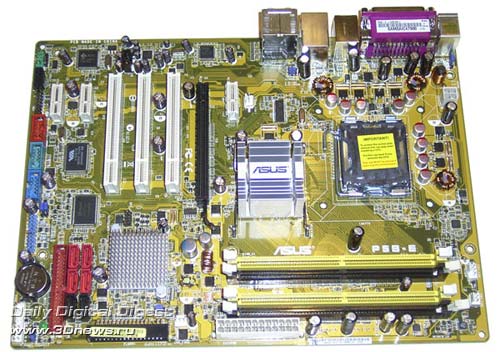 However, at the expansion options this motherboard is far not the last. This is how all the basic features of the chipset are implemented: 6 Serial ATA links, high-speed Gigabit LAN connection, 8 USB 2.0 ports, and integrated 8-channel audio. Besides, the board uses the additional Firewire controller (2 ports), as well as the additional SerialATA II/ParallelATA RAID controller JMB363. The latter has added support for 2 SerialATA II links (one of which brought over to the rear panel), as well as one ParallelATA link.  The board uses one PCI Express x16, three PCI , and three regular PCI Express x1 slots.  The rear panel features in that a Serial ATA II and a Firewire port have been brought over to it, with an optical and coaxial SP-DIF outputs positioned instead of one of the COM ports.  In terms of functionality, the board is rather powerful. Despite that the set of memory latency timings is practically standard, this motherboard demonstrated a superb compatibility to memory modules.  The system monitoring settings are standard:  But the overclocking tools are really powerful (which holds true for revision 1.02G).  In particular, the board allows adjusting the FSB speed within 100 to 650 MHz, raising the CPU voltage to 1.7 V , on the memory - to 2.45 V, as well as raising voltage on the north bridge to 1.7 V, on the south bridge - to 1.215 V, and on the FSB - to 1.45 V. In real overclocking, the motherboard showed superb results - a stable operation at FSB=520 MHz. Experiments with overclocking are much facilitated by the OC Profile technology which allows saving two independent kits (profiles) of BIOS settings.  Interim conclusion: to date, ASUS P5B-E is a well-balanced product of the middle pricing category. Pros:
For a detailed review, see ASUS P5B-E ASUS P5N32-SLI SE DeluxeThis is another ASUS' high-end motherboard, this time based on nForce4 SLI Intel Edition. It features in wide expansion options and, most importantly, support for the SLI and 2 Parallel ATA links.  First, let's list the expansion options: the board supports 10 USB 2.0 ports, 6 SerialATA II links, two Gigabit LAN controllers, and 8-channel integrated audio (with ALC850 used as the codec). Besides, there is an additional chip to support the Firewire (2 ports).  The configuration of expansion slots: two PCI Express x16 slots, two PCI Express x1, one PCI Express x4, and two regular PCI slots.  The rear panel is of practically standard configuration, except the missing COM ports, where the SP-DIF input and output are positioned instead, as well as a Serial ATA II port. One of the COM ports is anyway implemented with a bracket.  The BIOS of Asus P5N32-SLI SE Deluxe is built on the Award BIOS Phoenix version.  We found no special issues of compatibility to memory modules. However, in terms of memory overclocking the board is evidently weaker than products based on Intel chipsets. As regards the system monitoring, the board keeps track of the CPU's and system's current temperatures, and the rotational speed of only three (of six) fans. Besides, the speed of the CPU cooler (as well as the cooler plugged in to the CHA_FAN1) can be set dependent on the CPU temperature using the Q-FAN 2 feature.  Let's list the overclocking tools: the FSB is adjustable within 200 to 400 MHz, CPU voltage can be raised to 1.7 V, on the memory - to 2.4 V, on the chipset - to 1.6 V (both to the north and south bridges), as well as on the FSB to 1.415 V. The results of real overclocking are middling: stable FSB speed = 300 MHz. 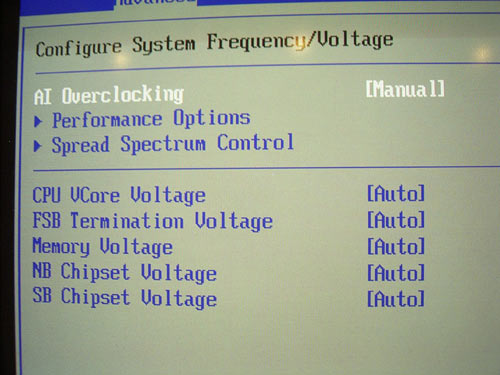  We note a rather powerful system for cooling the board, which includes radiators on the power components of the power supply module which are linked to the radiators on the chipset with heat pipes. If needed, the user can install additional fans (which are available in the bundle):  Interim conclusion: ASUS P5N32-SLI SE Deluxe is one of the few motherboards which offer simultaneous support for Intel Core 2 Duo and the SLI. The board also supports 2 Parallel ATA links, which will be interesting for owners of respective devices. Pros:
For a detailed review, see ASUS P5N32-SLI SE Deluxe ASUS Striker, ASUS P5N32-E SLI, and ASUS P5N32-E SLI PLUSWe'll be reviewing these three motherboards at a time - they are based on the same PCB design. All have the Striker label, but on the models ASUS P5N32-E SLI and ASUS P5N32-E SLI PLUS it is glued with a piece of paper. The final difference among the listed products are insignificant. In particular, ASUS Striker falls within the "Republic of Gamers" series and features in a richer package bundle (Ghost Recon, licensed version of 3DMark 06 Advanced Edition, external thermal sensors, clamps, an additional fan, a leather keychain, and a SoundMAX microphone), a massive cooling system, additional SerialATAII Sil3132 controller, a diagnostic LCD screen, Power, Reset buttons, and a button to clear the BIOS settings. In the end, ASUS is positioning this motherboard as an exclusive product aimed at overclockers and computer enthusiasts. In this case, the exclusive character costs a lot: ASUS Striker is offered at prices within $300 to $380, whereas its light version ASUS P5N32-E SLI sells at prices within $220 to $240. Once we are talking about the price, we note that ASUS P5N32-E SLI PLUS is also offered at prices within $220 to $240, but unlike ASUS P5N32-E SLI it is based on the combination of nForce 650i SLI and nForce 570 SLI chipsets. ASUS has dubbed this combination as NVIDIA Dual X16 SLI, and in terms of functionality it makes no difference from the nForce 680i SLI (i.e., it supports the full-featured SLI 16 + 16).  ASUS Striker 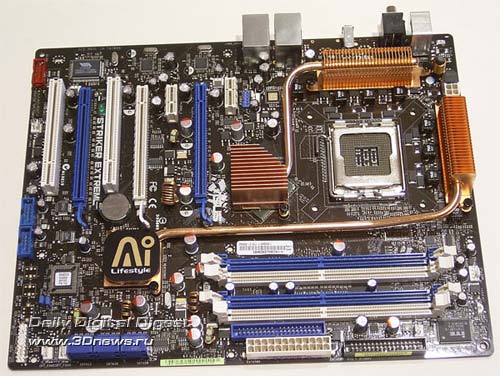 ASUS P5N32-E SLI  ASUS P5N32-E SLI PLUS First, let's list the expansion options: each of the boards supports 10 USB 2.0 ports, 6 SerialATA II links, two Gigabit LAN controllers, and 8-channel integrated audio (with ADI AD1988B chip used as the codec positioned on a separate board). Besides, on these boards there is a chip to support the Firewire bus (2 ports). And, as we already stated, the Striker model offers an additional SerialATAII Sil3132 controller (+ 2 respective ports, both located on the rear panel).  The configuration of expansion slots: three PCI Express x16, one PCI Express x1, two regular PCI slots, and a slot for the audio board. 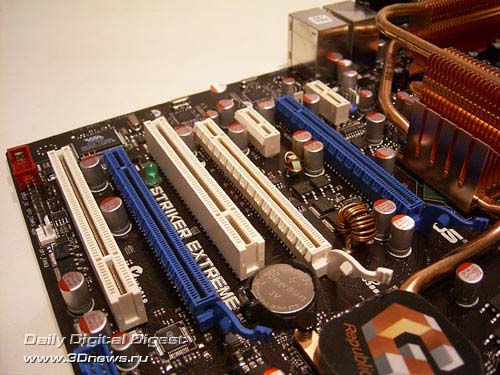 The rear panel of Striker differs in a complete lack of LPT and COM ports. Instead of them, there is a diagnostic LCD screen, optical and coaxial SP-DIF outputs, as well as two SerialATA II connectors, a Firewire port, and a power management button.  ASUS Striker On ASUS P5N32-E SLI and P5N32-E SLI PLUS, there is no screen, neither a button nor SATA connectors.  ASUS P5N32-E SLI and P5N32-E SLI PLUS The BIOS of all the three boards is based on the Award BIOS Phoenix version and is 99% identical.  We found no special issues of compatibility to memory modules. As regards the system monitoring, this section is the most powerful of all we have ever seen. First, the board is able monitoring the current temperature of the CPU and the system, as well as three temperatures from three additional thermal sensors. The user gets the unique opportunity to keep track of the temperature of any system components within reach of these sensors (their length is about 45 cm). Secondly, the board monitors whatever voltages of the system Thirdly, the motherboard keeps track of the speed of all the eight(!) fans which can be plugged in and controls their speed with the Q-Fan feature. We also note that you can do the system monitoring from within Windows with the PC Probe2 utility.  Let's list the overclocking tools: FSB is adjustable within 133 to 750 MHz, CPU voltage can be raised to 1.9 V, on the memory - to 3.425 V, on the chipset - to 2.75 V (on the north and south bridges - to 1.85V), as well as on the FSB to 1.55 V. However, the actual overclocking results are far from the best. Even with the latest BIOS version the stable frequency was not 486 MHz. 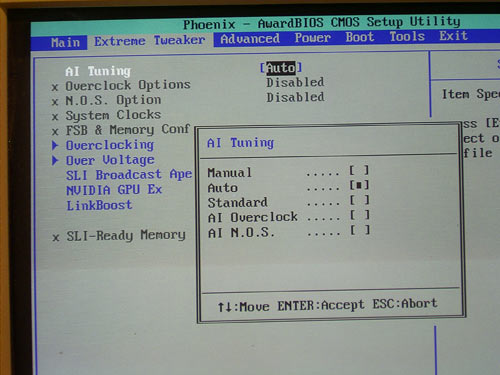  We note a rather powerful cooling system of the board, which includes radiators of the power components of the power supply module which are linked to the radiators on the chipset with heat pipes. If needed, the user can install additional fans (which are available in the bundle):   Interim conclusion: ASUS Striker and its versions are among the few motherboards which offer simultaneous support for Intel Core 2 Duo and the full-speed SLI technology. However, ASUS offers similar motherboards in its assortment but based on the cheaper nForce 590 SLI IE chipset. On the following page, we'll be reviewing a motherboard like that with the final conclusions regarding the Striker family made at the end of the material. Pros:
A detailed review of ASUS Striker A detailed review of ASUS P5N32-E SLI A detailed review of ASUS P5N32-E SLI PLUS ASUS P5N32-SLI PremiumMotherboards based on the NVIDIA nForce 590 SLI Intel Edition chipset have not gained much popularity among the manufacturers, so the number of finished products was minimum. Nevertheless, ASUS has released a very interesting motherboard - ASUS P5N32-SLI Premium.  Isn't the PCB design familiar? The three previous motherboards offer the same design: in development of the Striker family, the design of P5N32-SLI Premium was almost completely replicated. Therefore, the board supports 8 USB 2.0 ports (two ports have been sacrificed for the installation of a Wi-Fi module),  8 SerialATA II links, two Gigabit LAN controllers, and 8-channel integrated audio (with the ADI 988B chip used as a codec, on a separate board). Besides, on the board there is a chip to support the Firewire bus (2 ports).  The configuration of expansion slots: three PCI Express x16 slots (to the blue and black slots, 16 bus lanes are allocated to each, and only 8 to the yellow slot), two PCI slots, one PCI Express x1 slot, and a slot for an audio card. 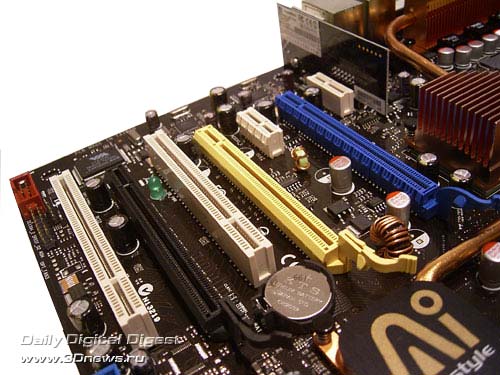 The rear panel is of practically standard configuration, except the missing LPT and COM ports, where the optical and coaxial SP-DIF outputs, as well as two Serial ATA II ports are positioned instead.  The BIOS of ASUS P5N32-SLI Premium is built on the Award BIOS Phoenix version.  We found no special issues of compatibility to memory modules. However, in terms of memory overclocking the board is evidently weaker than products based on Intel and NVIDIA 6?? series chipsets. The board keeps track of the processor's and system's current temperatures, current voltages, and rotational speeds of all the five fans. Besides, the speed of the CPU cooler (as well as the cooler plugged in to the CHA_FAN1) can be set dependent on the CPU temperature using the Q-FAN 2 feature.  Let's list the overclocking tools: FSB is adjustable within 100 to 525 MHz, CPU voltage can be raised to 1.8 V, on the memory - to 2.55 V, on the chipset - to 1.7 V (on the north and south bridges - to 1.65V), as well as on the FSB to 1.5 V. The actual overclocking results are middling: stable FSB speed = 345 MHz. We note a rather powerful cooling system of the board, which includes radiators of the power components of the power supply module which are linked to the radiators on the chipset with heat pipes. If needed, the user can install additional fans (which are available in the bundle):  Here goes the interim conclusion: if the user is not an extreme overclocker, then ASUS P5N32-SLI Premium can compete versus ASUS P5N32-E SLI and P5N32-E SLI PLUS. It also offers three PCI Express x16 slots onboard and supports almost all ASUS' proprietary technologies. Moreover, due to the additional SerialATA/RAID controller and a Wi-Fi module it is more advantageous at the expansion options. At the package bundle, it is also better: there are two additional fans and a SoundMAX microphone. The only shortcomings is that it costs precisely as much as ASUS P5N32-E SLI and P5N32-E SLI PLUS ($220-240). It is very hard to pay such amount for a motherboard built on the chipset of the previous generation. If the user needs overclocking over the bus up to 350 MHz and higher, this motherboard can be safely ruled out. Pros:
A detailed review of ASUS P5N32-SLI Premium ASUS P5N-E SLIWe are reviewing another motherboard by ASUS that offers support for the SLI. This is P5N-E SLI and is based on the NVIDIA nForce 650i SLI chipset. This chipset is the lowest of the nForce 6xx series with support for SLI. Its main distinctions from the top-end 680i SLI are in that in the SLI mode to each of the video cards 8 PCI Express bus lanes are allocated. At the same time, the overall number of lanes is 18, which does not allow for installing the third PCI Express x16 slot onboard (the 680i SLI chipset supports 46 lanes). Besides, the chipset does not support the SLI-Ready Memory technology whose support is the privilege of the nForce 680i SLI.  The board supports 8 USB 2.0 ports, 5 SerialATA II links, a Gigabit LAN controllers, and 6-channel integrated audio (with ALC883 chip used as the codec). Besides, on the board there is a chip to support the Firewire bus (2 ports), and due to the nForce 650i SLI chipset the motherboard supports 2 Parallel ATA links.  The configuration of expansion slots: two PCI Express x16, two PCI slots, and a PCI Express x1.  In general, the expansion options are quite balanced, except the 6-channel audio. Clearly, the developers tried to make the product as cheap as possible, which resulted in the mechanical SLI-terminator, but I don't think the difference between the 6- and 8-channel audio subsystem is so essential. The rear panel is of almost standard configuration except the missing COM ports. Instead of one of the COM ports, there is a coaxial SP-DIF output. Instead of the second COM port, there is a SerialATA II port. One of the missing COM ports is provided by the PCB design and implemented with a plate (missing in the bundle).  The BIOS of ASUS P5N32-SLI Premium is built on the Award BIOS Phoenix version.  We found no essential issues of compatibility to memory modules. The board keeps track of the processor's and system's current temperatures, current voltages, and rotational speeds of all the three fans. Besides, the speed of the CPU cooler can be set dependent on the temperatures with the Q-FAN 2 feature.  Let's list the overclocking tools: FSB speed adjustment 133 to 750 MHz, raising voltage on the CPU up to 1.7V, up to 2.517V on the memory, and up to 1.748V on the chipset.  The actual overclocking results are perfect: stable FSB speed = 500 MHz. Here goes the interim conclusion: ASUS P5N-E SLI has proved an effective demonstration of how a product priced at $150 of dignified consumer properties can be created. And I did like this motherboard even more than many others based on the P965 chipset. In particular, it fully meets the demands of the average user: two, sometimes three SerialATA disks, one or two ParallelATA drives, support for USB and Firewire. In this context, support for the SLI is regarded as a free expansion of the future functionality. Besides, we note the superb overclocking capability of the motherboard. At that, ASUS P5N-E SLI based on NVIDIA nForce 650i SLI is not inferior to the best overclocker motherboards based on P965, and thus joins the "500 MHz club". We note separately the future support for future Intel Core 2 Duo processors with the bus speed 1333 MHz and a lot of ASUS proprietary technologies. And all that is at quite affordable price! Pros:
A detailed review of ASUS P5N-E SLI Gigabyte 965P-DQ6 Board LayoutThis is a very interesting motherboard which features in support for two PCI Express x16 slots, a powerful cooling system, 12-phased power supply module.  Besides the mentioned PCI Express x16 slots, the board uses three PCI Express x1 and two PCI slots.  As regards the expansion options, they fully meet the specifications of the P965 chipset. That is, the board supports 6 SerialATA II links, 8-channel integrated HDA, a Gigabit LAN controller, and 10 USB 2.0 ports. Besides, the developers have installed an additional SerialATA II/ParallelATA RAID controller which provided support for two SATA and one PATA links. The board also has a chip that provides support for the Firewire.  The design of the rear panel has practically standard configuration, except the COM1 port, where the optical and coaxial SP-DIF output is positioned instead.  The BIOS of Gigabyte 965P-DQ6 is based on the Award BIOS Phoenix version.  We found no special issues of compatibility to memory modules. As regards the system monitoring, the board displays the current temperature values of the CPU and system, as well as the rotational speed of the two fans. Besides, the CPU cooler is able adjusting the rotational speed depending on the CPU temperature.  Let's list the overclocking tools: FSB adjustable within 200 to 700 MHz, raise of voltage on the CPU to 2.375 V, on the memory - to 2.575 V, on the chipset - by +0.775 V (to the north bridge), and to the FSB - by +0.35 V. Combined with a powerful supply module, the motherboard demonstrated superb overclocking results: stable FSB speed = 500 MHz!  Of the additional features, we note support for the Quad BIOS technology,  a radiator on the reverse side of the board,  and two massive radiators on the power supply module.  Interim conclusion: Gigabyte 965P-DQ6 is one of the best products based on P965, and is a direct competitor to ASUS P5B-Wi-Fi Deluxe. Pros:
For a detailed review, read Gigabyte 965P-DQ6 Gigabyte 965P-DS4Gigabyte 965P-DS4 is a light version of the previous motherboard (Gigabyte 965P-DQ6). The differences are in the "weaker" power supply module and in the package bundle (no E-SATA plates). At the same time, the model DS4 costs $35-40 cheaper, and at functionality it is fully identical to the more costly version. In my view, it is quite an attractive option, especially that engineers at Gigabyte are continuously improving the motherboards, so 965P-DS4 is already of revision 3.3!  The board uses two PCI Express x16, three PCI Express x1, and two PCI slots.  As regards the expansion options, they fully meet the specifications of the P965 chipset. That is, the board supports 6 SerialATA II links, 8-channel integrated HDA, a Gigabit LAN controller, and 10 USB 2.0 ports. Besides, the developers have installed an additional SerialATA II/ParallelATA RAID controller which provided support for two SATA and one PATA links. The board also has a chip that provides support for the Firewire.  The design of the rear panel has practically standard configuration, except the COM1 port, where the optical and coaxial SP-DIF output is positioned instead.  The BIOS of Gigabyte 965P-DQ6 is based on the Award BIOS Phoenix version.  We found no special issues of compatibility to memory modules. As regards the system monitoring, the board displays the current temperature values of the CPU and system, as well as the rotational speed of the two fans. Besides, the CPU cooler is able adjusting the rotational speed depending on the CPU temperature.  Let's list the overclocking tools: FSB adjustable within 200 to 700 MHz, raise of voltage on the CPU to 2.375 V, on the memory - to 2.575 V, on the chipset - by +0.775 V (to the north bridge), and to the FSB - by +0.35 V. Combined with a powerful supply module, the motherboard demonstrated superb overclocking results: the stable FSB speed = 528 MHz! 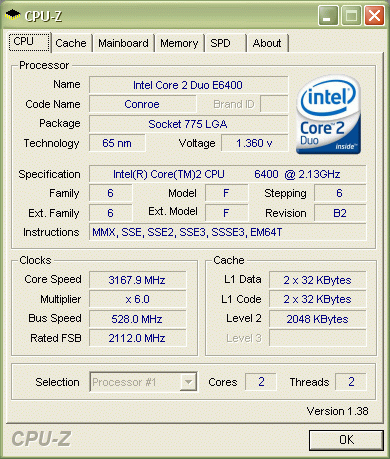 Of the additional features, we note support for the Dual BIOS technology, as well as radiators on the reverse side,  and two massive radiators on the power supply module.  Interim conclusion: Gigabyte 965P-DS4 is one of the best products based on P965, and is a direct competitor to ASUS products. Pros:
A detailed review of Gigabyte 965P-DS4 Gigabyte 965P-DS3Gigabyte 965P-DS3 was one of the first motherboards that appeared at our test lab and immediately surprised us with its high retail price. By the present time, its price has gone down to ~$130, which is quite acceptable. With this money, the user gets only the basic capabilities of the P965 chipset.  The board uses one PCI Express x16, three PCI Express x1, and three PCI slots.  Among the remaining expansion options are 10 USB 2.0 ports, integrated 8-channel audio, and a Gigabit LAN controller. Besides, there are 4 Serial ATA II links (without support for RAID). A couple of Serial ATA II links (and one Parallel ATA link) are implemented with an additional RAID controller. 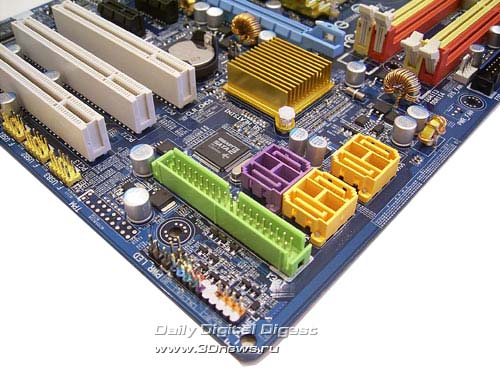 The design of the rear panel has practically standard configuration, except the COM1 port, where the optical and coaxial SP-DIF output is positioned instead.  The board's BIOS also provides the necessary kit of memory settings.  The system monitoring section is indeed weak because the voltage monitoring is only half-implemented. In all the other respects, there is nothing to complain about: the board keeps track of the processor's and system's current temperature, as well as the rotational speed of the two fans. Besides, the user can bind the fan's rotational speed to the CPU temperature.  As to the overclocking capabilities, the board showed quite decent results (FSB=450 MHz).  Here are the overclocking features: FSB adjustable within 200 to 700 MHz, raise of voltage on the CPU to 2.0 V, on the memory - to 2.4 V, on the north bridge - by 0.3 V, and on the FSB - by +0.3 V. Interim conclusion: Gigabyte 965P-DS3 is a typical workhorse, with overstated price, scarce package bundle, but of very good overclocking capabilities. Pros:
A detailed review of Gigabyte 965P-DS3 Gigabyte 965G-DS3We are dwelling on Gigabyte 965G-DS3 because it is an exact replica of Gigabyte 965P-DS3 with the integrated graphic core G965.  The unified PCB design has pre-determined the same number of expansion slots (one PCI Express x16, three PCI Express x1, and three regular PCI slots),  as well as identical expansion options: ten USB 2.0 ports, integrated 8-channel audio, a Gigabit LAN controller, as well as an additional Serial ATA II controller (in the end, the board supports 6 Serial ATA II and one Parallel ATA links).  Note the lack of COM ports on the rear panel. Instead of the first port, there are optical and coaxial SP-DIF outputs, and in the stead of the second - a VGA output.  The only accessible COM port has been implemented with a bracket (which is missing in the package bundle). By the way, the package bundles of Gigabyte 965G-DS3 and Gigabyte 965P-DS3 are equally scarce. The board's BIOS offers a standard selection of settings.  The system monitoring section fully coincides with the respective BIOS section of Gigabyte 965P-DS3.  The same can be said about overclocking tools.  Here are the overclocking features: FSB adjustable within 200 to 700 MHz, raise of voltage on the CPU to 2.0 V, on the memory - to 2.4 V, on the north bridge - by +0.3 V, and on the FSB - by +0.3 V. But the practical results have proved much lower - a stable FSB speed did not exceed 300 MHz. Evidently, the integrated video core reduces the board's overclocking capability. As regards the performance of the integrated core at 3D applications, at that the board can't please the user. The operating speed is higher than that of i915G but lower than i945G. Anyway, engineers at Gigabyte can't be blamed for that - the problem is in Intel drivers. Pros:
Foxconn 975X7ABThe distinguishing feature of Foxconn 975X7AB is the digital power supply module. In all the remaining aspects, that is an ordinary motherboard based on i975X with standard expansion options, functionality and overclocking tools. We put a special emphasis on the package bundle which includes all the required components to assemble a system.  We should also note the two PCI Express x16 slots, which allows using two video cards merged following the Crossfire technology.  Also, there are two PCI and two PCI Express x1 slots onboard.  Among the remaining expansion options are 5 Serial ATA II links, 4 of which are supported by the south bridge ICH7R, and one more - by the additional chip JMB361 made by JMicron. The same chip provides support for one ParallelATA link. In the end, as many as 9 hard disks (5 SATA II + 4 PATA) can be plugged in to the motherboard. The board also uses two Gigabit LAN controllers, 2 Firewire ports, 8 USB 2.0 ports, and integrated 8-channel audio. The rear panel features in that it lacks any COM ports (there is only one port implemented with a bracket).  Besides, there is an additional FoxOne chip which is meant for doing such tasks like dynamic overclocking, system monitoring, power management, and control over the fans' rotational speeds. At the same time, it closely interacts with the utility of the same name that allows the user to control the mentioned features from within Windows.  Another feature of the motherboard - there is a Power-On button.  The BIOS is based on the Award BIOS Phoenix version.  The memory settings are standard. At the same time, it should be noted that there is no reducing memory frequency multiplier for use with Core 2 Duo processors. But that is a key advantage of the i975X chipset over P965! The system monitoring section does not feature in rich functionality: the board keeps track of the current temperatures for the CPU and the system, rotational speeds of the three (of four) fans , as well as the voltage levels. Besides, the cooler plugged in to the CPU_FAN is able adjusting the rotational speed depending on the CPU temperature.  The overclocking features have been implemented just as "tick off": FSB adjustable within 266(133) to 600 MHz, adjustable voltage on the CPU within -21% to +24%, on the memory - within -0.15 V to +0.6V, on the chipset - within -0.12 V to +0.24 V (0.04 V), on the FSB - within -0.09 V to +0.18 V (0.03 V).  In practice, the board demonstrated a stable operation at FSB = 366 MHz. That is a low result which invalidates all the advantages of the digital power supply module.  Interim conclusion: with the retail price $230, Foxconn 975X7AB will be rather hard to compete against other products based on the i975X chipset. Pros:
For a detailed review, read Foxconn 975X7AB Foxconn P9657AA-8EKRS2HAnother middle-end motherboard based on the P965 chipset. This is Foxconn P9657AA-8EKRS2H which features in good expansion options and an additional FoxOne chip.  The motherboard has one PCI Express x16, one PCI Express x1, one PCI Express x4, and three "regular" PCI slots. 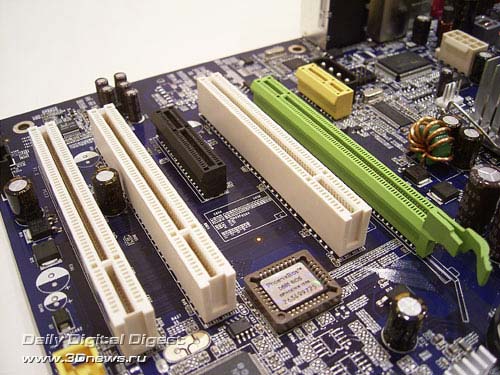 Among the remaining expansion options are 6 Serial ATA II (ICH8R) links, a Gigabit LAN controller, 10 USB 2.0 ports, two Firewire ports, and integrated 8-channel audio.  Besides, this motherboard supports one ParallelATA link with an additional JMB361 controller. This chip also supports one SerialATA II link - the respective ports is brought over to the rear panel.  The motherboard features in an additional FoxOne chip:  the BIOS is in many ways similar to the BIOS of Foxconn 975X7AB. In particular, the section of memory latency timings and system monitoring are fully identical.   As regards the overclocking tools, the FSB is adjustable within 133 to 600 MHz, the CPU voltage can be raised by +0.3 V, on the memory - within -0.15 V to +0.6 V, on the chipset - within -0.12 V to +0.24 V (0.04 V), and on the FSB within -0.09 V to +0.18 V (0.03 V). 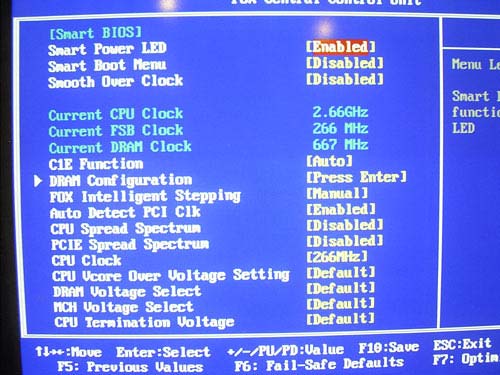 During practical experiments, the board showed very poor results: stable FSB speed = 320 MHz. Interim conclusion: the board is a good framework for a mid-end computer. Anyway, there are some shortcomings to note: somehow overstated price, scarce package bundle, and a really weak overclocking capability. Pros:
For a detailed review, read Foxconn P9657AA MSI P6N SLI PlatinumThis board is based on NVIDIA nForce 650i SLI, is aimed at middle-end systems and is a direct competitor to ASUS P5N-E SLI. 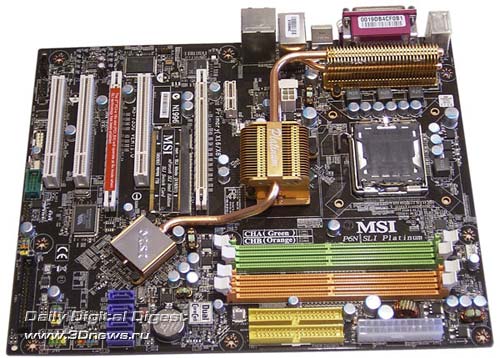 The board supports 8 USB 2.0 ports, 5 SerialATA II links, a Gigabit LAN controllers, and 8-channel integrated audio (with ALC888 chip used as the codec). Besides, on the board there is a chip to support the Firewire bus (2 ports), and due to the nForce 650i SLI chipset the motherboard supports 2 Parallel ATA links.  The configuration of expansion slots: two PCI Express x16, three PCI slots, and a PCI Express x1,  Like P5N-E SLI, the motherboard MSI P6N SLI Platinum uses a mechanical SLI-terminator. The rear panel is of almost standard configuration except the missing COM ports. Instead of one of the COM ports, there is a coaxial SP-DIF output and a Firewire. Instead of the second COM port, there is a SerialATA II port. One of the missing COM ports is provided by the PCB design and implemented with a plate (missing in the bundle).  Note that there is the Dual CoreCell unit which is meant for doing such tasks like dynamic overclocking, system monitoring, power management, and control of the fans' rotational speeds. It also closely interacts with the Dual CoreCenter utility that allows the user to control the mentioned features.  The BIOS of ASUS P5N32-SLI Premium is built on the AMI BIOS version.  The list of available memory latency timings will suit to most users. The board keeps track of the processor's and the system's current temperatures, current voltages, and rotational speeds of the three (of four) fans. Besides, the speed of the coolers can be set dependent on the temperatures with the Smart FAN feature.  Let's list the overclocking tools: FSB adjustable within 100 to 625 MHz, raise of voltage on the CPU by 0.3875 V, on the memory - to 2.8 V, on the north bridge - to 1.5V, on the south bridge - to 1.7V, and on the FSB - to 1.7V. Besides, the overclocker can raise voltage on the FSB by 20%:  However, the actual overclocking results are pretty modest: stable FSB speed = 376 MHz. Here goes the interim conclusion: MSI P6N SLI Platinum is a typical product of the mid-end price category and at the same time offers quite a decent onboard set of expansion options, supports modern MSI's proprietary technologies (most of which are set dependent on the additional Dual CoreCell chip). Pros:
Detailed review of MSI P6N SLI Platinum MSI P965 PlatinumMSI, like Gigabyte and ASUS, has presented a motherboard based on P965 on which there are two PCI Express x16 slots. Therefore, the board supports the ATI Crossfire (16+4) as well as allows plugging in four monitors to a single system.  Besides the PCI Express x16 slots, the board uses two PCI Express x1 and two PCI slots.  Among the remaining expansion options are 6 Serial ATA II links (supported by ICH8R) plus one more Serial ATA II link (due to the additional RAID controller JMB361), 1 Parallel ATA link (again the same JMB361), a Gigabit LAN controller, support for the Firewire (2 ports) and USB 2.0 (10 ports), as well as integrated 8-channel audio (ALC883).  The rear panel is almost standard. The only point is that instead of the COM2 port there is a Firewire port and a coaxial SP-DIF output.  The board features in the additional Dual CoreCell chip which is meant for doing such tasks like dynamic overclocking, system monitoring, power management, and control over the fans' rotational speeds. It also closely interacts with the Dual CoreCenter utility that allows the user to control the mentioned features.  The board's BIOS is based on AMI BIOS version.  The memory settings and the system monitoring section are standard.  The board displays the current temperatures for the processor and the system, voltage, as well as rotational speeds of all the three fans. Besides, the CPU cooler and the cooler plugged in to SYSFAN1 is able adjusting the rotational speeds depending on the temperature of the CPU and the system. Regarding the overclocking tools, the FSB is adjustable within 200 to 500 MHz, the CPU voltage can be raised by 0.7875 V, on the memory - to 2.45 V, and on the north bridge - to 1.84 V.  In practice, the board showed middling results - the stable operation at FSB=366 MHz. Note that the retail price is one of the lowest in its class. Among the pros is the good expansion options and overclocking tools. Of negative sides is the BIOS and software flaws. Of special note is the superb package bundle. After the release of a detailed review of this motherboard, representatives of MSI informed us that retail motherboards MSI P965 Platinum will have not one Serial ATA cable and an adapter, but 4 and 2, respectively. Besides, the box will contain one more bracket with two Firewire ports. Pros:
Detailed review of MSI P965 Platinum MSI P965 NeoThis motherboard is one of the cheapest models based on P965 chipset. At the same time, the functionality of the board has not been cut down - even on the contrary: the developers have installed an additional RAID controller!  The board offers one PCI Express x16 slot, two PCI Express x1, and three regular PCI slots.  Among the remaining expansion options are 4 Serial ATA II (ICH8) links, a Gigabit LAN controller, 8 USB 2.0 ports, and integrated 8-channel audio.  Besides, the motherboard supports one Parallel ATA link and one Serial ATA II link with an additional JMB361 controller.  The BIOS settings are pretty scanty. In particular, the section of memory latency timings and system monitoring contain too few parameters.   As to the overclocking tools, they are there, and they work well. Here they are: the FSB is adjustable within 133 to 333 MHz, the voltage on the CPU can't be raised, but voltage on the memory can be raised to 2.4 V and on the chipset - up to 1.85 V.  During practical experiments, the board showed the following results: stable FSB speed = 333 MHz. Evidently, the board's capability is higher and further overclocking is bounded by the narrow range of FSB selection. Conclusion: the motherboard is good from the "price/performance" consideration; with the relatively low price it offers support for PATA and has overclocking tools. Pros:
For a detailed review, read MSI P965 Neo MSI P965 Neo2Despite the similarity of the names MSI P965 Neo and MSI P965 Neo2, the PCB design of these motherboards is different. MSI P965 Neo2 looks more interesting due to the PCI Express x4 slot with the split rear wall (which allows installing a video card into the slot).  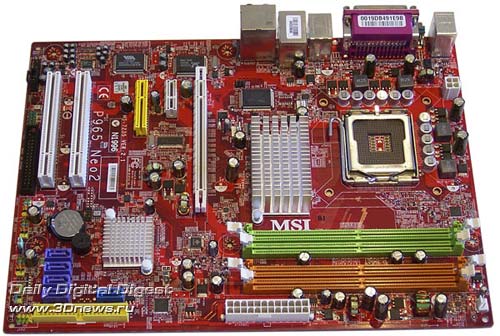 At functionality, the motherboard is close to MSI P965 Neo: 4 Serial ATA II (ICH8) links, a Gigabit LAN controller, 8 USB 2.0 ports, and integrated 8-channel audio. Besides, the board has an additional RAID controller owing to which the motherboard supports the fifth SerialATA link and one ParallelATA link. Another additional controller provides support for the Firewire bus (2 ports).  The motherboard has one PCI Express x16, one PCI Express x4, one PCI Express x1, and two "regular" PCI slots. 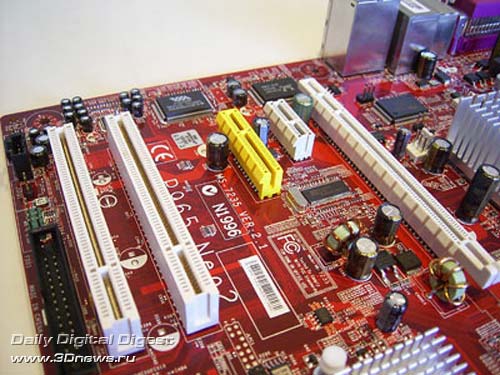 The rear panel is practically standard:  The BIOS (AMI BIOS) settings are pretty scanty. In particular, the section of memory latency timings and system monitoring contain too few parameters.  The board displays the current temperatures for the processor and the system, rotational speeds of all the three fans, as well as voltage levels. Besides, the board offer support for the Smart Fan feature that allows for dynamic adjustment of the CPU cooler's rotational speeds depending on the CPU temperature.  As regards the overclocking tools, they have been implemented somehow better than on MSI P965 Neo. Here they are: FSB adjustable within 100 to 650 MHz, raise of voltage on the CPU by 0.7875 V, on the memory - to 2.45 V, on the north bridge - to 1.5V, on the south bridge - to 1.8V, and on the FSB - to 1.44V.  However, during practical experiments, the board showed moderate results: stable FSB speed = 346 MHz. Conclusion: the motherboard is good from the "price/performance" consideration; with the relatively low price it offers support for PATA, Firewire, and has overclocking tools. Pros:
? detailed review of MSI P965 Neo2 Intel D975XBX2 (i975X)This motherboard needs to be reviewed in more detail, because it was not formerly tested at our lab. As a rule, Intel motherboards are not of much interest in terms of testing: they run absolutely reliably, have a stable BIOS, basic expansion options, and a complete lack of overclocking tools. The latter makes them absolutely not attractive to overclockers, and the high price (these boards are mainly aimed at system integrators) may scare the users away. However, D975XBX2 strongly stands out among the other items in Intel's assortment: it is aimed at PC enthusiasts and offers powerful overclocking tools. This motherboard was originally designed for that purpose, so we can expect very good overclocking results (because who else knows the features of Intel i975X chipset better than engineers at Intel?). We should also note that the board is dubbed "Bad Axe", which has nothing to do with "poor". The English language has a number of own linguistic intricacies. In particular, in the American English the word "Bad" has a positive meaning. For example, "Bad Ferrari"means a powerful, aggressive and nice-looking Ferrari car".  The board's design is somehow nonstandard because of three PCI Express x16 slots. Note that the main (24-pin) and additional (8-pin) power connectors are positioned over the board's edges. The board operates only with 24+8 PSUs, whereas old PSUs are unsuitable! The additional 4-pin Molex connector is positioned near the rear panel. The cable is inconvenient to plug in, but that is recommended only when installing powerful video cards into the AMD/ATI Crossfire array. On the board, there are two 3-pin and two 4-pin connectors for plugging in fans (the PCB design provides installation of one more connector which is unsoldered on our board). On of them is reserved for the CPU cooler, whereas the others are accessible to the user. The thing is, the cooling of the chipset is passive: on the north bridge, there is a massive aluminum radiator, on the south bridge - also an aluminum one but of much smaller size.  Under the CPU socket, there are 4 slots for memory modules. The first and second slots relate to the first memory channel, with the second and third - to the second channel. Therefore, to switch the memory to the dual-channel mode the modules should be fitted into slots of the same color.  Also, there are three PCI Express x16 and two "regular" PCI slots onboard.  The board offers the following expansion options: 4 Serial ATA II links which are supported by the south bridge ICH7R (black connectors),  plus 4 Serial ATA II links which are implemented with the Marvell 88SE6145 chip (blue connectors).  Therefore, the board allows plugging in up to 10 hard disks (8 SATA II and 2 PATA). Then, the board uses an Intel 82573 Gigabit LAN controller:  The board offers support for 8 USB 2.0 ports, 4 of which are mounted on the rear panel, with 4 more ports connected with brackets. Besides, the board supports two IEEE1394 (Firewire) ports, one of which is positioned on the rear panel, with the other is plugged in via a bracket. To support this feature, there is an additional TSB43AB23 controller onboard:  Finally, the board uses integrated 8-channel audio on the base of SigmaTel 9274D codec.  The configuration of the rear panel is practically standard, except the lack of the 2nd COM port (where the SP-DIF coaxial output is positioned instead).  Among the special features, we should note the button to start up the system.  The board's BIOS is based on Intel BIOS version.  The number of memory settings is standard; plus there is a feature for adjusting voltage on the memory.  The adjustment range is within 1.8 V to 2.8 V in 0.4 V increments. If we compare the table of specifications, we arrive at the conclusion that it is a very powerful overclocking tool.  The board also supports a complete set of memory frequency multipliers, including a reducing multiplier:  The memory settings and the set of system monitoring sensors are practically standard.  We note the feature for adjusting the rotational speed of the CPU cooler depending on the CPU temperature. Besides, the board supports a standard (for all Intel motherboards) logging feature, and support for multilingual menus,  as well as a feature for saving the BIOS settings into a nonvolatile memory (supports only one kit of settings, or a profile)  Now on to the overclocking functions in more detail: But before that we turn to a 5-phased power supply module of the motherboard which contains four 1200 mkF and nine 560 mkF capacitors.  Note that on the power supply components there are small radiators resembling flame tips in shape. The board allows adjusting the FSB speed within 133 to 500 MHz (in the latest BIOS version), as well as a multiplier over all the admissible range.  The CPU voltage is adjustable within 1.8275V to 1.6V in 0.0125V increments.  Voltage on the chipset is adjustable within 1.5 V to 1.7 V in 0.025V increments.  Besides, the board is able adjusting voltage on the FSB within 1.2V to 1.5V in 0.025V increments.  As a result, powerful overclocking tools and the skills of engineers at Intel have brought the motherboard D975XBX2 to the category of best overclocker motherboards based on the i975X chipset: stable operation was preserved up to FSB=450 MHz.  Let's see how precise the board is at setting the nominal FSB speed: there is an overstatement by more than 1.5 MHz!  Conclusion: Intel D975XBX2 is absolutely different from all the previous Intel's top-end motherboards. It offers powerful expansion options, an exciting set of overclocking tools which are enhanced by real results. It seems like the only shortcoming of the motherboard is in the high price and OEM package bundle. Pros:
Intel DG965RYCKAfter testing the motherboard Intel D975XBX2, I wondered if Intel changed the attitude to the overclocking tools, or if D975XBX2 is the only motherboard for enthusiasts in the assortment. To verify that, we bought a DG965RYCK in the nearest shop (the selection of G965 chipset is not accidental - I wanted to verify if there is drop of performance in the integrated graphic core with which we came across when testing Gigabyte 965G-DS3).  The PCB design is optimized for creation of both Full-ATX and Micro-ATX motherboards. The board has conveniently positioned main (24-pin) and additional (4-pin) power connectors. We also note that latches of the DIMM slots are blocked by an external video card. There are two 3-pin and two 4-pin connectors for plugging in fans. The scheme of cooling the chipset is the same as it is in Intel D975XBX2.  Under the CPU socket, there are 4 slots for memory modules. The first and second slots relate to the first memory channel, with the second and third - to the second channel. Therefore, to switch the memory to the dual-channel mode the modules should be fitted into slots of the same color.  The board uses one PCI Express x16, three PCI Express x1, and three regular PCI slots.  The board offers the following expansion options: 4 Serial ATA II links which are supported by the south bridge ICH8 (black connectors). Besides, there is a Marvell 88SE6101 chip to support one Parallel ATA link.  It is amusing that marketing people at Intel first gave up support for Parallel ATA in the chipsets and then upon awareness of the need for this protocol made the engineers install an additional chip (which adds to the price of the board). Therefore, the board allows plugging in 6 hard disks (4 SATA II and 2 PATA). Then, the board uses an Intel 82566DC Gigabit LAN controller:  The board has 8 USB 2.0 ports, 6 of which are on the rear panel, with 2 more plugged in with a bracket (missing in the package bundle). Besides, the motherboard supports the Firewire with a TSB43AB22A controller made by Texas Instruments.  Finally, the board offers integrated 8-channel audio on the base of SigmaTel 9274D codec.  On the rear panel, there are no COM ports. Instead of one, there is a VGA output of the integrated video core, and instead of the second, to all appearances, there should be a DVI connector. In fact, the board does support one COM port with a bracket (missing in the bundle), with the respective connector positioned between the DIMM slots.  The board's BIOS is based on Intel BIOS version.  The user gets only the standard kit of memory latency timings,  and logging tools.  The remaining BIOS features are fully standard, with no overclocking tools. In conclusion, let's take a look at the package bundle:  It is pretty scanty, but in view of the low retail price (starting with $105) we can rate it as good. Conclusion: DG965RYCK is a typical workhorse and is aimed at office systems. However, the poor 2D quality prevents us from recommending this motherboard. As regards the drop of performance in 3D applications versus the chipsets i945G and i915G, there is nothing to worry about here. All the three chipsets are equally slow at modern games, and the low speed is caused by the shortcomings of the drivers (which will be fixed in the nearest future). Pros:
ECS NF650SLIT-AThere are some complaints about the board's design: very inconvenient latches of PCI Express slots, inconvenient positioning of additional power connectors (4-pin and Molex), and blocking the DIMM latches by the first video card.  The board uses three 3-pin and one 4-pin connector to plug in fans. One of them is reserved for the CPU cooler, the other is used to plug in a cooler on the north bridge, with the remaining ones accessible to the user.  Under the north bridge, there are 4 slots for memory modules. The first and second slots relate to the first memory channel, with the second and third - to the second channel. Therefore, to switch the memory to the dual-channel mode the modules should be fitted into slots of the same color.  There are two PCI Express x16, two PCI Express x1, and three PCI slots.  The board offers the following expansion options: 4 Serial ATA II links which are supported by the south bridge nForce 430i (MCP51);  the same chip provides support for 2 ParallelATA links. Therefore, the board allows plugging in up to 8 hard disks (4 SATA II and 4 PATA). Then, on the board there is a Gigabit LAN controller Marvell 88E1116(PHY): 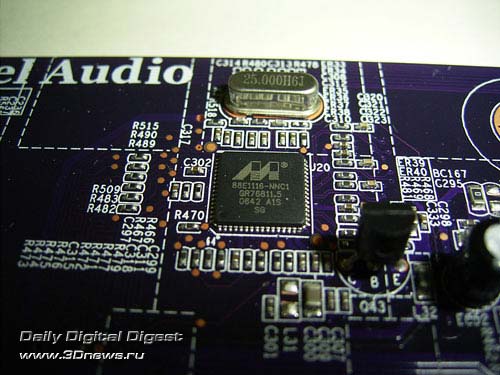 The board offers support for 8 USB 2.0 ports, 4 of which are mounted on the rear panel, with 4 more ports connected with brackets. Besides, the PCB design provides for installation of an additional Firewire controller, but it is not installed on the current model. Finally, the board offers integrated 8-channel audio on the base of the ALC883 codec.  The configuration of the rear panel is practically standard, except the lack of the 2nd COM port (where the optical and coaxial SP-DIF output is positioned instead), and the lack of LPT port.  The board's BIOS is based on the Award BIOS Phoenix version.  The number of memory settings is standard; there is also a feature for displaying the current timings, which is very convenient.  The memory settings and the set of system monitoring sensors are practically standard. We note the feature for adjusting the rotational speed of the CPU cooler depending on the CPU temperature.   The board also supports a complete kit of overclocking tools, except the raise of voltage on the north bridge:   In particular, the board allows adjusting the FSB speed within 133 to 625 MHz, as well as a multiplier over all the admissible range. Besides, the user can adjust voltage on the CPU within 0.85 V to 1.6 V in 0.00625 V increments, on the memory - within 1.85 V to 1.95 V in 0.05 V increments, on the south bridge - within 1.2 V to 1.55 V in 0.05 V increments, and on the FSB - within 1.2 V to 1.4 V in 0.05 V increments. Now let's try the overclocking features in practice: But before that we turn to the 4-phased power supply module of the motherboard which contains four 1800 mkF and eight 820 mkF capacitors.  The actual overclocking did not prove impressive: stable operation retained at frequencies up to FSB=360 MHz.  Let's see how precise the board is at setting the nominal FSB speed:  Conclusion: despite some shortcomings, we liked the motherboard in general. Now we should compare the "price/attraction" ratio versus other motherboards based on NVIDIA nForce 650i SLI. We should note that the board is the most interesting product of all the reviewed and made by ECS (PN2 SLI2+ doesn't count - that is NVIDIA's reference). Although the overclocking capability is not impressive, nevertheless it is quite sufficient for overclocking low-end Core 2 Duo CPUs with the 200 MHz bus. Pros:
ECS nForce 570 SLIT-AUntil ECS NF650SLIT-A has appeared in the retail, those who wish to assemble a cheap SLI system can turn to the model nForce 570 SLIT-A which is based on nForce 570 SLI Intel Edition.  As regards the SLI, the board uses two PCI Express x16 slots (i.e. in the SLI mode they enable 8 channels each). Also, there are two PCI Express x1 and three PCI slots onboard.  The expansion options are fully standard: 4 Serial ATA II (nForce 430) links , a Gigabit LAN controller, 8 USB 2.0 ports, and integrated 8-channel audio.  The rear panel looks like this:  Instead of one of the COM ports, there is an optical and coaxial SP-DIF output. The missing COM port is even not provided by the PCB design. The BIOS of ECS nForce 570 SLIT-A is built on the Award BIOS Phoenix version. The list of available memory latency timings is standard and is made in the section to do with the overclocking settings:  The board keeps track of the processor's and system's current temperature and the rotational speed of all the three fans. Besides, the speed of the processor cooler can be set dependent on the CPU temperature with the Smart FAN feature.  As regards the overclocking tools, only raise of voltage on the CPU to 1.6V and on the memory to 2.2 V have been implemented. Also, ECS nForce 570 SLIT-A allows adjusting the system bus speed within 200 to 325 MHz.  The actual overclocking result is 300 MHz, which was good for the end of the past year, but with the release of the nForce 6xx series it is a poor result.. Interim conclusion: the motherboard offers a good enough "price/performance" ratio; at the same time it supports Core 2 Duo processors and the NVIDIA SLI technology. Pros:
For a detailed review, read ECS nForce 570 SLIT-A ECS PN2 SLI2+First off, two things to note: this motherboard was not developed by ECS since that is an NVIDIA's reference based on the nForce 680i SLI chipset. That is, Elitegroup has designed only the package and the concept of the package bundle. The second point relates to the price - it is over $300, which is comparable to that for ASUS Striker. In fact, the price may change but even if it goes down to $220, the board would have to compete versus ASUS P5N32-E SLI based on the same chipset ( nForce 680i SLI ).  Let's list the expansion options: the board supports 10 USB 2.0 ports, 6 SerialATA II links, two Gigabit LAN controllers, and 8-channel integrated audio (with ALC885 used as the codec). Besides, on these boards there is a chip to support the Firewire bus (2 ports).  The configuration of expansion slots: three PCI Express x16 slots, two PCI Express x1, and two regular PCI slots.  The rear panel differs in a complete lack of LPT and COM ports. In fact, one COM port can be plugged in with a bracket but unfortunately it is missing in the package bundle.  The BIOS is based on the Award BIOS Phoenix version.  We found no special issues of compatibility to memory modules. We also note that the current latency timings are displayed over here, which is quite convenient. As regards the system monitoring, the board monitors the current temperatures of the CPU, the system, and the south bridge, the rotational speeds of five (of seven) fans, as well as the voltage levels. Besides, the rotational speed of the six coolers can be set dependent on the temperatures using the respective features.  Let's list the overclocking tools: FSB is adjustable within 100 to 625 MHz, CPU voltage can be raised to 1.8 V, on the memory - to 2.5 V, on the chipset - to 1.55 V (on the north and south bridges - to 1.75V), as well as on the FSB to 1.55 V. However, the actual overclocking results are not the best. In particular, the stable FSB speed = 440 MHz.  The board's cooling system includes radiators on the power components of the power supply module,  as well as radiators on the chipset which are linked with a heat pipe. If needed, the user can install an additional fan (which are available in the bundle): Among the special features of the board, we note a 7-stage POST indicator, as well as Power and Reset buttons.  Here goes the interim conclusion: a motherboard of NVIDIA's reference design based on the 680i SLI chipset, this product is very good but has one essential shortcoming - a high retail price. As regards ECS' contribution to the development of PN2 SLI2+, it is about the box contents (of the interesting points - a bracket with ESATA, a 3" panel, and a LAN cable). Pros:
For a detailed review of the board, read ECS PN2 SLI2+ ECS P965T-AECS has presented the middle-end motherboard P965T-A which supports the basic functionality and at the same time has the second PCI Express x16 slot.  In fact, only 4 PCI Express lanes are allocated to the second slot, which equalizes its capabilities as compared to MSI P965 Neo2. Besides, the board offers two PCI Express x1 slots and three "regular" PCI slots.  At functionality, the motherboard is also close to the model MSI P965 Neo2: 4 Serial ATA II (ICH8) links, a Gigabit LAN controller, 8 USB 2.0 ports, and integrated 8-channel audio. The board has an additional RAID controller owing to which the motherboard supports the fifth SerialATA link and one ParallelATA link.  The rear panel is practically standard:  The BIOS (Award BIOS Phoenix) settings can't be regarded as rich. In particular, the section of memory latency timings and system monitoring contain too few parameters.  The board displays the current temperatures for the processor and the system, rotational speeds of all the three fans, as well as voltage levels. Besides, the board offer support for the Smart Fan feature that allows for dynamic adjustment of the CPU cooler's rotational speeds depending on the CPU temperature.  As regards the overclocking tools, only raise of voltage on the CPU by 0.15V and on the memory - by 0.35V have been implemented.  The FSB speed is selectable of several standard values: 100,133,166,200,233,266, and 333 MHz. Therefore, the maximum possible result is 333 MHz, which the board just showed. Conclusion: the motherboard is very good from the "price/performance" consideration; with the relatively low price it offers support for PATA, has overclocking tools, and the second PCI Express x16 slot. Pros:
For a detailed review, read ECS P965T-A PerformanceIn our test setup, we used the following hardware:
We used a customary set of application benchmarks. Let's first take a look at the results of synthetic benchmarks.  These are exclusively synthetic benchmarks which demonstrate the theoretical performance. Now, tests of real-world applications.          We are not dwelling on the performance, because all the boards showed approximately the same performance. And the difference in speed between the boards is small enough, and any slight update to the BIOS can turn everything upside down. Therefore, we'll be making the choice of a motherboard following different criteria such as operational stability, expansion options, package bundle, compatibility to various components, compatibility to memory modules, and the price of the boards. It is much more interesting to look at the graph of overclocking results:  Final WordsFirst of all, a few words on the "Republic of Gamers" series motherboards made by ASUS. It includes the two models: Commando (P965) and Striker (NVIDIA nForce 680i SLI). 
ASUS Commando

ASUS Striker
In the technical viewpoint, both the boards have nothing to complain about. While we were testing the Striker version, we had no well-polished BIOS version. Now this problem has gone, and the motherboard easily coped with 500 MHz for the bus (let alone the Commando version, which took 520 MHz at the first attempt). The complaints to this series was in very high retail prices which are not substantiated by anything. Especially indicative is Striker: for the game Ghost Recon, licensed version of 3DMark 06 Advanced Edition, external thermal sensors, clamps, additional fan, a leather keychain and SoundMAX microphone all put in the package bundle), as well as for the massive cooling system onboard, additional SerialATAII Sil3132 controller, diagnostic LCD-screen, the buttons Power, Reset, and clear the BIOS settings the buyer is charged $120! But that is a view on the situation from the viewpoint of practice and economy. There are a lot of buyers who don't treat this $120 as an essential amount, and the ownership of an exclusive motherboard is a weighty argument. It's just for these purposes motherboards of the Republic of Gamers series is the best choice, so both of them are granted the "Tycoon's Choice" award. By the way, ASUS is the first and only company to create exclusive products for its premium sector, and the first motherboard was ASUS Black Perl (i815EP) which was tested at our test lab over 6 years ago. We now coming back to the real world and choose a motherboard for the uncompromising overclocker and the PC enthusiast. The definition of this user category implies using two high-end video cards (and a physics accelerator in future). The final selection is simple enough - that is a motherboard with support for the SLI (ATI/AMD Crossfire has failed to win popularity among users). These motherboards are based on NVIDIA nForce 680i SLI, and the most powerful and functional one is the model ASUS P5N32-E SLI (one of the Striker modifications). 
ASUS P5N32-E SLI
The price for it is surprisingly reasonable: $200-230 as of mid-June 2007! That is even cheaper than some motherboards based on NVIDIA nForce 650i SLI! In the end, the board is granted the "Editor's Choice" award. 
In this case, I mean MSI P6N SLI Platinum whose only specimen was found at the workshop of a retailer (price.ru). That is, we see a simple situation of unadjusted price. That happens quite often: look at the prices of motherboards for Gigabyte 965G-DS3 and Gigabyte 965P-DS3. They are practically identical motherboards, but the model with integrated video core costs cheaper! Note that ASUS itself developed the design of the board based on 680i SLI. The remaining motherboards are available in the retail - these are of NVIDIA's reference design made under various trade marks. Their "price/functionality" ratio prevents us from recommending them for purchase. Now let's look at cheaper motherboards with support for SLI which are based on nForce 650i SLI. In this case, these are ASUS P5N-E SLI and ECS NF650SLIT-A which sell at the same price ($120-$130). Even if we ignore the company names, the ASUS product is better anyway: it offers more SerialATA links, there is support for Firewire, a wide selection of proprietary technologies, the BIOS features and overclocking tools have been developed better. At the latter point, I'd like to note that ASUS P5N-E SLI has overcome the "FSB = 500 MHz" bar.  Awards - "Best Buy" and "Overclocker's Choice"!  
As regards ECS, its produce is competitive in the sector under $100. That is, at $80-$90 the user can get ECS nForce 570 SLIT-A which, albeit based on the chipset of the previous generation, is the only of the 30 reviewed which is priced below $100.  The "Best Buy" award!
Now let's see what can the user preferring a single video card choose. The number of such users is much more than those who own SLI systems, partly because a single video card is cheaper than two, and also because the number of nice-looking games requiring at least a single high-end video card is very small (2-3, at best). That is, the choice will be among motherboards based on Intel 975X and P965. The we divide the users (unless they mind it) into those who need functionality and those who need the maximum overclocking (i.e. maximum performance). The motherboards of most functionality are abit AB9 Pro (~$130), abit AW9D-MAX (~$206), ASUS P5W-DH Deluxe (~$210-225), ASUS P5B Premium Vista Edition (~$230-245), ASUS P5B Deluxe Wi-Fi (~$200), ASUS P5B-E (140-$150), Gigabyte 965P-DQ6 (~$200-220), Gigabyte 965P-DS4 (~$165-180), MSI P965 Platinum (~$135-140), and Intel D975XBX2 (~$225). We immediately rule out the abit motherboard: perfect products, we liked them very much, but unfortunately they don't sell in Russia. Then - in the range >$200 the best positions are taken by ASUS P5W-DH Deluxe (AI Remote, but there are reducing memory multipliers),  The "Recommended" award! 
ASUS P5B Premium Vista Edition (a very rich package bundle),  The "Best Buy" award!
ASUS P5B Deluxe Wi-Fi (rich package bundle, support for Wi-Fi).  The "Overclocker's Choice" award!
However, all the three motherboards are different from one another, so you simply can't choose the best among them! Note that ASUS P5W64-WS Pro stands alone among the others: only this motherboard has 4 PCI Express x16 slots onboard, so we grant it the "Innovation Design" award. 
In the 150$-$200 range, the best motherboard is Gigabyte 965P-DS4 rev3.3. As we already noted, it's an almost complete replica of Gigabyte 965P-DQ6 - it has the same functionality.  Besides, this motherboard showed the best overclocking results. Therefore, two awards at a time - - "Best Buy" and "Overclocker's Choice"!
Then, in the range within $125 to $150 the choice is evident enough: merely two motherboards (ASUS P5B-E and MSI P965 Platinum) offer the close "price/attraction" ratio. At the same time, ASUS P5B-E is the most expensive but is best optimized for overclocking.  The "Overclocker's Choice" award!
MSI P965 Platinum is $10 cheaper, but it allows two PCI-E video cards!  The "Recommended" award!
Within the $100-125 range, there are a few motherboards: Foxconn P9657AA ($100-120), Gigabyte 965P-DS3(~$120-130), Gigabyte 965G-DS3($110-130), MSI P965 Neo(~$100-110), MSI P965 Neo2(~$105), Intel DG965RYCK(~$105-115), and ECS P965T-A(~$100-110). Two of them deserve the most attention: Foxconn P9657AA which at functionality can complete versus more expensive boards,  The "Best Buy" award!
and Gigabyte 965G-DS3 which at the same specifications as Gigabyte 965P-DS3 costs cheaper and offers the integrated video core.  The "Best Buy" award!
However, we can't fully rule out Gigabyte 965P-DS3 since it showed the best overclocking results in this group.  The "Overclocker's Choice" award!
We should also mention MSI P965 Neo2 and ECS P965T-A, which allow installing two video cards. Therefore, the user can choose just the product which best suits the requirements. 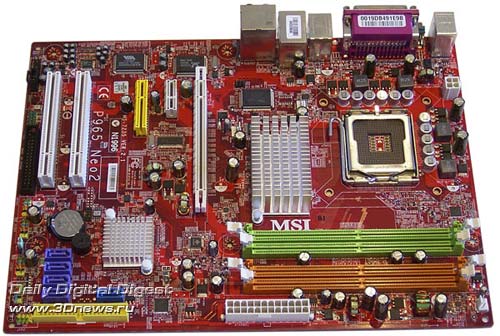 Both the boards have been granted the "Recommended" award.
Here are the overall conclusions for all the motherboards: among all the reviewed motherboards, we have not found any evidently poor product. Even those motherboards which we don't recommend to buy are quite suitable for use from the technical viewpoint. But the problem is that they cost much higher than their direct competitors - i.e. the problem is not in terms of stability or functionality but in the mispricing. Another important point to note: almost half the reviewed motherboards are made by ASUS. This manufacturer takes a leading position on the Russian market (according to our polls) and takes the lion's share of all the awards. Its competitors are some products by Gigabyte, MSI, and ECS. At the same time, during our tests there have been no product manufactured by a tier two company. These companies are experiencing not the best times, and some (like EpoX) have left the field of motherboards manufacture at all. That is, the picture appears to be rather sad: if in the nearest future the competition among manufacturers goes down, then we (users) are in for a stagnation (unless Intel breaks out with another revolution, the way it was with LGA775 or with the release of Core 2 Duo processors). On the other hand, leading manufacturers are continuously expanding their assortment: never before we have seen such a number of various motherboards on a single chipset. Even within one and the same pricing range some companies offer three or more equally good motherboards which differ in only fine points: some offer a bit better package bundle, others - a better package bundle, or a higher overclocking capability. In the end, with a complete lack of tier two manufacturers the buyers' task is increasingly getting difficult. |
|||||||||||||||||||||||||||||||||||||||||||||||||||||||||||||||||||||||||||||||||||||||||||||||||||||||||||||||||||||||||||||||||||||||||||||||||||||||||||||||||||||||||||||||||||||||||||||||||||||||||||||||||||||||||||||||||||||||||||||||||||||||||||||||||||||||||||||||||||||||||||||||||||||||||||||||||||||||||||||||||||||||||||||||||||||||||||||||||||||||||||||||||||||||||||||||||||||||||||||||||||||||||||||||||||||||||||||||||||||||||||||||||||||||||||||||||||||||||||||||||||||||||||||||||||||||||||||||||||||||||||||||||||||||||||||||||||||||||||||||||||||||||||||||||||||||||||||||||||||||||||||||||||||||||||||||||||||||||||||||||||||||||||||||||||||||||||||||||||||||||||||||||||||||||||||||||||||||||||||||||||||||||||||||||||||||||||||||||||||||||||||||||||||||||||||||||||||||||||||||||||||||||||||||||||||||||||||||||||||||||||||||||||||||||||||||||||||||||||||||||||||||||||||||||||||||||||||||||||||||||||||||||||||||||||||||||||||||||||||||||||||||||||||||||||||||||||||||||||||||
|
|
|
|||||