abit LG-95C vs. ASUS P5E-V HDMI
Author:
Date: 26.01.2008
|
|
BIOS
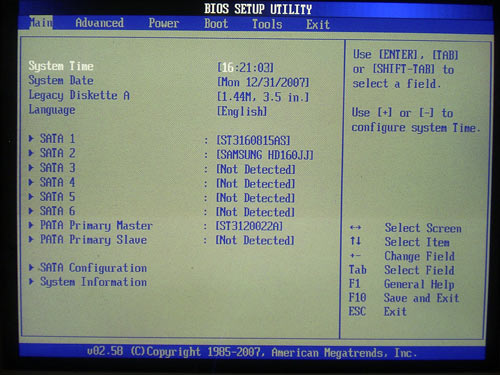
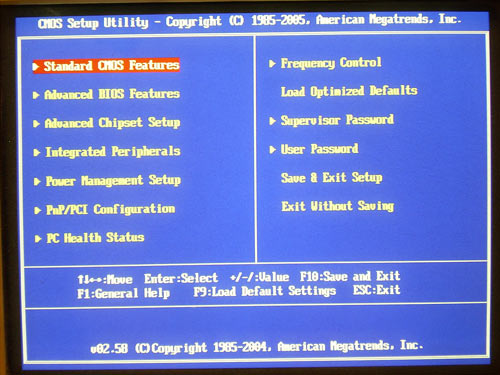
The BIOS of ASUS P5E-VM HDMI and abit LG-95C is based on the AMI BIOS version.
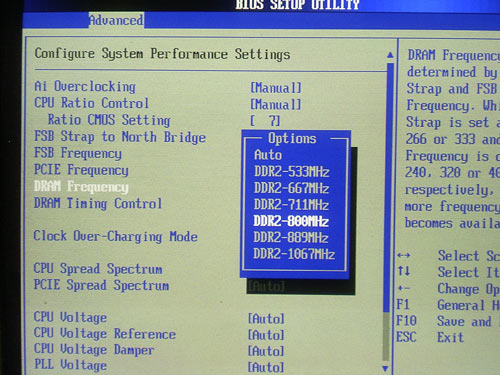
Due to the more up-to-date G35 chipset, the ASUS board offers a greater number of memory frequency multipliers:
But the kit of latency timings available for adjustment does not depend on the chipset but solely on the board's developer. At that, the ASUS boards is superior.
Now look at the system monitoring section.
The respective section of the abit board is pretty scanty. In particular, the board keeps track of the CPU's supply voltage only. On the other hand, there is nothing to complain about the ASUS board: the quality of the system monitoring implementation is the same as that on motherboards of a higher class.
Both the boards support the feature for adjusting the rotational speed of the CPU cooler depending on the temperature. ASUS P5E-VM HDMI implements the Q-Fan2 feature:
On abit LG-95C, there is a similar feature - Smart Fan:
Besides, both the boards allow the user to leverage all the technologies implemented in Intel's latest processors:
The kinship of the BIOS in ASUS P5E-VM HDMI to that of higher-class boards has directly affected the abundance of features. For instance, the board offers the OC Profile technology which allows saving all the BIOS settings into memory and loading them on demand (two independent profiles are implemented).
The BIOS version can be updated in a number of ways. First, make use of the AFUDOS (DOS) and ASUS Update (Windows) utilities, and in the latter case the POST image can be recorded into the BIOS (for that, there is the MyLogo 3 feature). Secondly, the user can resort to the EZ Flash 2 utility integrated into the BIOS. The file with a new firmware can be located not only on a regular 3" floppy but also on a hard disk or a USB flash drive.
Finally, the board offers support for the CrashFree BIOS 3 (restoring the damaged BIOS firmware with a CD or a flash disk).
The only point where we found a shortcoming is the Multilanguages BIOS which looks as follows.
Overclocking and stability
Let's look and the power supply modules. ASUS P5E-VM HDMI implements a 4-phase scheme with ten 560 mkF and three 271 mkF capacitors. The abit LG-95C uses a 3-phase power scheme, in which there are three 1800 mkF, four 680 mkF, and two 560 mkF capacitors.
We put it straight off that the abit board almost lacks any overclocking tools. However, there is a respective section in the BIOS; it displays the FSB speed but it can't be changed. Also, the earlier BIOS versions, there used to be a feature for adjusting voltage on the memory modules. But it has gone in the latest firmware.
As regards the ASUS board, it is all fine about it: there are all the required overclocking tools in place.
| Board |
ASUS P5E-VM HDMI |
abit LG-95C |
| Multiplier adjustment |
+ |
- |
| FSB adjustment |
within 200 to 800 MHz (1) |
- |
| Vcore adjustment |
within 1.1 to 1.7 V (0.0125 V) |
- |
| Vmem adjustment |
within 1.8 to 2.44 V (0.02 V) |
- |
| Vdd adjustment |
within 1.25 to 1.71 V (0.02 V) |
- |
| Vsb/Vpcix adjustment |
1.05 V, 1.2 V |
- |
| Vtt adjustment |
within 1.2 to 1.5 V (0.02 V) |
- |
| PCI-E adjustment |
within 100 to 150 MHz (1) |
- |
Apart from the main overclocking tools, the ASUS board offers support for a lot of secondary features, like "Clock Over-Charging Mode",
"CPU Voltage Damper",
"Reference Voltage" for the CPU, and the north bridge,
as well as the "CPU PLL Voltage" which is meant for fine-tuning the power supply of quad-core processors.
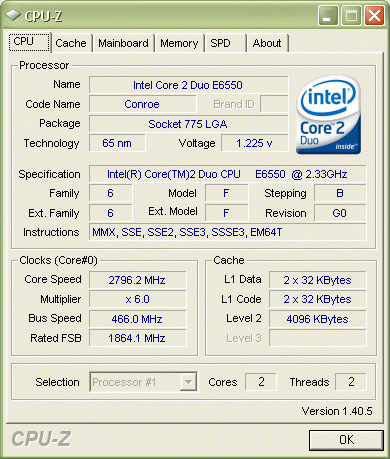
Now let's look at the practical results of overclocking. The maximum stable FSB speed in the ASUS board is 466 MHz:
Now a few words on the ASUS NOS (Non-Delay Overclocking System) mode in which overclocking is available on demand. Simply put, the raise of FSB speed occurs at the time a resource-hungry application (e.g., a game) starts up. On closing the application, the system reverts to the rated frequency.
It allows overclocking the system with AI Suite which includes tools for overclocking, monitoring, AI Gear, and AI Nap:
 |
Content: |
 |
|
|
Top Stories: |
|
 |
|
MoBo:
|
|
|
|
VGA Card:
|
|
|
|
CPU & Memory:
|
|
|