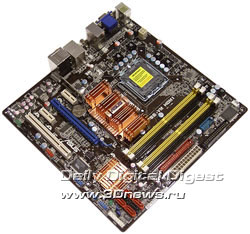
abit LG-95C vs. ASUS P5E-V HDMI
Author:
Date: 26.01.2008
|
|
Performance tests
While determining the starting FSB speed, it turned out that the abit board sets it at a very high precision, whereas the ASUS board overstates it by 1.3 MHz.
In our test setup, we used the following hardware:
Note that we have switched to using the Vista operating system. On the one hand, that is a call of the times (the year 2008 is already there) and this OS offers more advanced (as compared to the XP) tools for administration and control, which is a great advantage for corporate users. On the other hand, we can't help noting the higher system requirements of this operating system, which degrades the already low operating speed of value systems. Nevertheless, developers of chipsets concentrate their efforts at debugging drivers just for Vista, to the detriment of XP. In the long run, that will end up in that XP will be forced out by Vista.
Now, regarding the drivers. The new version of Intel's graphic drivers has introduced certain changes to the operation of integrated chipsets, and we have to note some special traits. Above all, the new drivers have not brought any substantial improvements to the 945GC chipset. For the G35, we note a higher image quality, as well as more expanded functionality (Comanche does start up!). But the higher quality has negatively affected the operating speed, which has gone down to some extent. However, in the X2 test we can see a substantial drop of performance. On the other hand, the image quality is simply fantastic and is not inferior to NVIDIA chipsets (asteroids on the screen are just asteroids and not dark spots as they used to be).
As regards the selection of test applications, we plan to introduce radical changes thereto. However, that does not apply to the integrated boards whose performance is hardly enough for "ancient" games. If we run Crysis or Company of Heroes on any integrated graphic core, we get 100 - 200 frames per hour (not per second).
Let's first take a look at the results of synthetic benchmarks.
Now on to the gaming benchmarks.
Another test - WinRar (Kb/s.; the more, the better)
We have also conducted a series of tests with an external video card and found out that the performance in this mode makes almost no difference from the operating speed of a system based on P35. That holds true for both ASUS P5E-VM HDMI and abit LG-95C. The latter is especially unexpected because the abit board is based on the relatively "old" i945GC.
Final Words
First of all, we note that ASUS P5E-VM HDMI and abit LG-95C fall within different sectors of the market and do not compete against one another. It is very easy to determine the purpose of the abit motherboard: that is a product for undemanding users who are not into high operating speed (which is equivalent to support for Core 2 Duo processors). This board offers basic expansion options, nevertheless the board offer a choice: to use integrated graphic core or install an external video card. At the same time, the unique trait of abit LG-95C is in two PCI Express x16 slots (you won't be able to install two modern video cards because the slots are positioned too close to one another). And perhaps at $60 it is the only option with such functionality. We also note that this board is absolutely non-typical for abit – it completely lacks any overclocking tools.
As regards ASUS P5E-VM HDMI, all is fine with overclocking in this motherboard. At all the other specifications (expansion options, support for proprietary technologies), there are also no complaints but one - the price: the board costs over $175! At the same time, the full-featured ATX motherboard ASUS P5E-V HDMI (with two PCI Express x16 slots) of which we talked in the beginning of the review cost almost as much - $185 («Sunrise-PRO»; early January, 2008). Needless to say, it is more advantageous to buy an ASUS P5E-V HDMI because you will make more value for money and, besides, the drop of prices for MicroATX versions is progressing much faster.
On the other hand, the small-size ASUS P5E-VM HDMI is the best solution for building a compact home-based entertainment center with the option of plugging in two monitors. Using a single monitor (or a TV-set), the user can watch HDTV-video, while the other user working at the second monitor. In fact, the small size of the board is its only advantage. On the other hand, ASUS P5E-V HDMI allows for a simultaneous use of the integrated video core and an external video card while plugging in four monitors! According to today's prices, this motherboard costs merely $10 as cheap.
Now let's sum it all up:
Conclusion
|
ASUS P5E-VM HDMI
|
abit LG-95C
|
Pros:
- high stability and good performance level;
- graphic core Intel GMA X3500 and one PCI Express x16 slot;
- support for SerialATA II (6 links; ICH9R);
- support for one P-ATA link (JMB363);
- integrated 8-channel audio and Gigabit Ethernet LAN controller;
- support for USB2.0 (12 ports) and IEEE-1394 (Firewire; 2 ports);
- support for HDMI.
Cons:
The board's specific features:
- well developed overclocking tools + good results.
|
Pros:
- high stability and good performance level;
- graphic core Intel GMA X950;
- two PCI Express x16 slots;
- support for SerialATA II (4 links; ICH7);
- support for one P-ATA link (ICH7R);
- low price!
Cons:
The board's specific features:
- overclocking tools missing.
|
- Discuss the material in the conference
|