ASUS Maximus Formula Special Edition (Intel X38)
Author:
Date: 16.12.2007 |
|
Overclocking and stability
Prior to moving to overclocking, let's look into the power converter. It uses a 8-phase power scheme in which there are two 271 mkF and eleven 561 mkF capacitors.
Note that engineers at ASUS have introduced the new technology Energy Processing Unit (or, the EPU). The idea behind it is that in the idle mode or under small load the power supply module operates following the 4-phase scheme. Under the full CPU load, the converter operates following the 8-phase scheme. Therefore, it becomes possible to reduce the overall power consumption level of the CPU.
In fact, this idea is not unique: some Chrysler motor cars use V-shaped 8-cylinder HEMI engines which under small load disengage four cylinders and thus save the expensive fuel. Similar examples can be found in the IT industry: in particular, a couple of years ago Gigabyte had the Dual Power System. The idea of that technology (briefly, the DPS) is in that near the 4-phase power converter there was a slot where the user could install a special board to make the converter run following the 8-phase scheme.
To facilitate the thermal mode of the power supply module, as well as for active cooling of the north bridge, the user can fit an additional fan (available in the bundle).
Now on to the overclocking features.
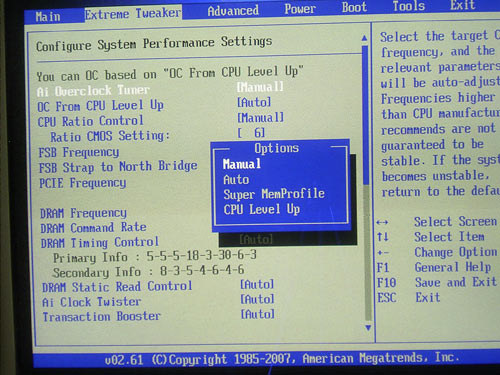
We note straight off that the board lacks the dynamic overclocking (ASUS calls this technology as NOS). Instead of that, there is support for Super MemProfile and CPU Level UP.
The ASUS Super MemProfile technology means support for the Intel XMP (Extended Memory Profiles). This is some sort of an analog to the NVIDIA EPP (Enhanced Performance Profiles) technology whose idea is in the additional information written in the SPD of the memory modules, where guaranteed stable memory operation parameters are listed. Each set includes information on the memory frequency, voltage, respective latency timings, and most importantly, the sub-timings. Therefore, overclocking with the Super MemProfile is performed based on the memory capabilities: the memory frequency is set to the maximum possible and then, with the available multipliers, the FSB (and thus the CPU clock speed) is set.
The second feature - CPU Level UP - is somehow simpler and easier: the Maximus board offers a fixed set of FSB/MEM frequency values, and for better perception each set meets the specifications of an Intel processor.
In particular, we set an E6550 on board and set the "CPU Level UP" equal to "E6700" (we remind it that the CPU offers the multiplier = 10, FSB = 266 MHz and, therefore, the clock speed 2.66 GHz). In the end, the board set the FSB to 380 MHz and left the multiplier unchanged (i.e. = 7). Therefore, we attained the clock speed of the CPU as 2.66 GHz. Also, the nice thing is that the board was aware that the memory as well could be overclocked and, using the multiplier 6/5, it set the memory frequency to 456 MHz (which is equivalent to DDR2-912).
Anyway, confirmed overclockers prefer tuning all the settings on their own. So, let's list all the respective features in sequence. First off, ASUS Maximus allows adjusting the system bus speed within 200 to 800 MHz in 1 MHz increments. Of convenience is that you can enter the desired FSB value from the keyboard. Secondly, there is a feature for adjusting the multiplier. In any case, it will be of use for owners of extreme 4-core Intel processors.
Thirdly, ASUS Maximus allows adjusting the Vcore voltage within very wide ranges: within 1.1 V to 2.4 V in 0.00625-0.025 V increments.
Besides, the user gets the features for adjusting the "CPU Voltage Reference" and "CPU PLL Voltage".
The advanced user can raise the Vmem from the nominal 1.8V to 3.4V (in 0.02V increments).
At the same time, the user can fine-tune voltage levels to the memory controller and to each of the memory channels:
Besides, we get a feature for raising voltage on the chipset on both the north bridge (within 1.25 V to 1.85V in 0.02V increments),
and on the south bridge.
The adjustment range is within 1.05 V to 1.225 V in 0.025 V. Besides, it is possible to raise voltage on the FSB from 1.2 V to 2.0 V in 0.02 V increments:
There is another parameter that allows adjusting the supply voltage of the north bridge. This is the "North Bridge Voltage Reference":
It is also possible to adjust the PCI Express bus speed within 100 MHz to 180 MHz.
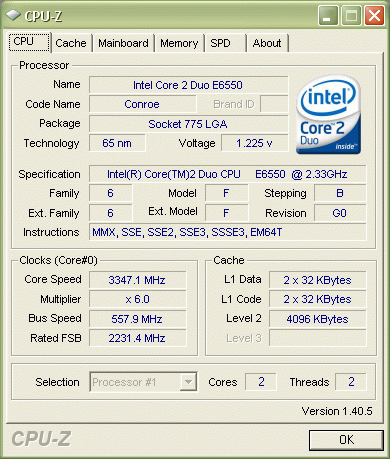
Now let's try the overclocking features in practice. To start with, ASUS Maximus showed fantastic results: a stable operation at FSB=544 MHz with a Conroe processor.
 This frequency was attained without change in the voltages on the north bridge and the FSB. As was the case with P5E3, we came across the situation when a slight change in these voltages (primarily, the Vdd) resulted in the failure of the system to start up. But after a detailed investigation into the board's behavior we found that it is able adjusting the above voltages on its own. In the end, the forced Vdd happens to be insufficient for a stable start and functioning of the system. Therefore, if we change voltage on the north bridge, that should be done with some margin. That was just the way we did and raised the Vdd to 1.8 V. We note it straight that such level is not recommended for air-driven cooling systems (especially, under long-term load). So we plugged in the Poseidon water-powered cooling system (we recently used that for tests of Blitz series motherboards):
 In the end, we attained the maximum possible FSB = 560 MHz, but long tests for stability showed that 100% operational stability is attained only at FSB = 558 MHz.
The hindrance to further overclocking is just the test specimen of CPU E6550 whose FSB Wall is right within 556 – 560 MHz. But the overclocking capability of ASUS Maximus is much higher!
However, the BIOS of the board is not yet fully polished, and the Maximus board still has certain flaws in terms of overclocking. In particular, the system won't start within the FSB range from ~500 to ~530 MHz, at the same settings which are used in 3DMark at 558 MHz.
Apart from the listed parameters, the BIOS offers two undocumented features like "Transaction Booster"
and "AI Clock Twister":
The maximum what we were able to find out: "Transaction Booster" and "AI Clock Twister" are able adjusting secondary latency timings and settings. In a word, they can be used for some slight performance gain but only once all the other means have failed, because raise of FSB by 1 - 2 MHz (i.e. increase in the CPU and memory frequencies by 10 MHz) gives a grater speed boost than the mentioned features.
 |
Content: |
 |
|
|
Top Stories: |
|
 |
|
MoBo:
|
|
|
|
VGA Card:
|
|
|
|
CPU & Memory:
|
|
|