ASUS P5E64 WS Professional vs. MSI X48 Platinum
Author:
Date: 27.02.2008 |
|
BIOS
The BIOS of both the motherboards is based on the AMI BIOS version.
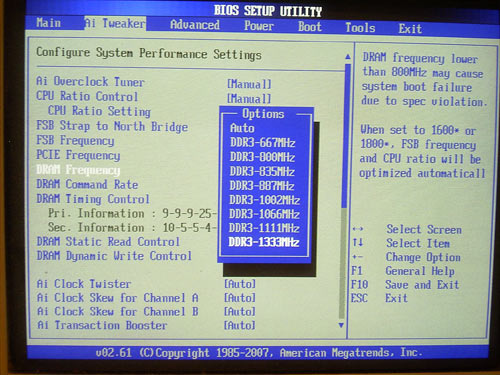
The section in charge of memory operation settings looks like this:
The next important parameter that affects the performance is setting the memory operating frequency.
Besides, the "Command Rate = 1T" setting (which for some reason is called "1N" in the MSI's board) will help somehow improve the performance.
Now look at the system monitoring section.
Both the motherboards display the current temperatures of the CPU and the system, and offer the feature for adjusting the rotational speed of the CPU cooler as well as additional fans, depending on the CPU and system temperatures.
Both the boards are able storing and loading the BIOS settings as profiles (two profiles altogether are supported).
To handle the BIOS, the ASUS motherboard offers the integrated EZFlash 2 utility:
Unfortunately, this feature suffers from flaws and hangs at the "A:" disk missing in the system (and we can't disable the FDD controller).
We also note the ASUS' feature for displaying the BIOS settings in multiple languages, and a section to control the features for Intel processors:
As regards the proprietary utilities, we note the updated version of ASUS AI Suite,
which offers an improved power-saving technology - Gear 3.
With this feature enabled (operates only if overclocking is switched off), the user is offered a few power consumption modes, from the minimum to the top performance (there is also the automatic mode). In the maximum saving mode, the board reduces the CPU multiplier, reduces the FSB speed and the CPU (Vcore) voltage. Result:
In so doing, the temperature of the CPU equals 22 C, which is less than the room temperature. Looking forward to the BIOS improvements.
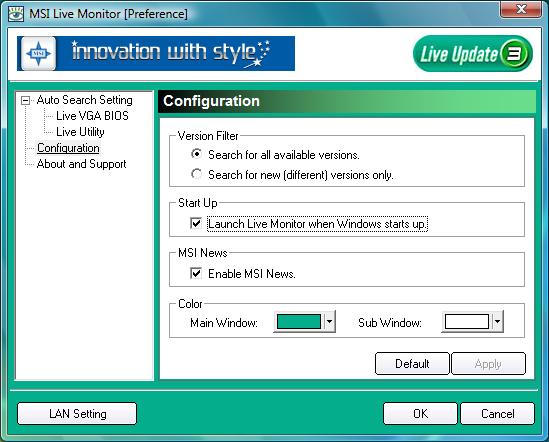
We have already talked about ASUS' proprietary utilities (like PC Probe II and ASUS Update) in the previous reviews. Now look at MSI's utilities. We have already got familiarized with part of them, and today's check concerns only the operability of utilities under MS Vista.
Note that we found no serious issues in LiveMonitor and DualCoreCenter. But it is very difficult to update the BIOS with LiveUpdate without access to Internet (even if you have the firmware file). Tests of the DualCoreCenter revealed no serious issues, except flaws in the interface.
Overclocking and stability
Before we move on to Overclocking, let's look at the power converters. The PWM of the ASUS' board uses a 8-phase scheme in which there are eleven 560 mkF and two 270 mkF capacitors. The PWM of the MSI' board uses a 8-phase power scheme, in which there are eleven 820 mkF and six 470 mkF capacitors.
On the ASUS' motherboard, all the PWM components are equipped with radiators, with only three fourths of these on the MSI board.
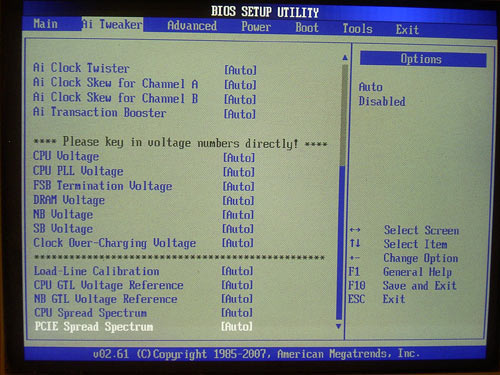
Now on to the overclocking features. On the ASUS motherboard, all the relevant features are gathered in the "Ai Tweaker" section,
an on the MSI board - in the "Cell Menu" section.
| Board |
ASUS P5E64 WS Pro |
MSI X48 Platinum |
| Multiplier adjustment |
+ |
+ |
| FSB adjustment |
within 200 MHz to 800 MHz (1 MHz) |
within 200 MHz to 800 MHz (1 MHz) |
| Vcore adjustment |
within 0.85 to 1.95V (0.00625 V) |
within 0 to +0.75 V (0.0125 V) |
| Vmem adjustment |
within 1.5 to 2.78 V (0.02 V) |
within 1.5 to 2.75V (0.08V) |
| Vdd adjustment |
within 1.25 to 1.91 V (0.02 V) |
within 1.25 to 1.83V (0.08V) |
| Vsb/Vpcix adjustment |
1.05 V; 1.2 V |
within 1.5 to 1.8 V (0.06V) |
| Vtt adjustment |
within 1.2 to 1.5 V (0.02 V) |
within 1.2 V to 1.44 V (0.04-0.05V) |
| PCI-E adjustment |
within 100 MHz to 150 MHz (1 MHz) |
within 100 MHz to 200 MHz (1 MHz) |
We note the following traits of the motherboards at overclocking. First, programmers at ASUS and MSI have added the feature for highlighting the parameters exceeding the range of safe overclocking (in their opinion) with different colors. Also, the ASUS board lacks the ASUS NOS (Non-Delay Overclocking System) technology which used to be implemented on almost all the previous models by this manufacturer. A similar feature is implemented on the MSI motherboard and is named D.O.T. It allows overclocking the system by ~73%.
Now let's look at the practical results of overclocking. The maximum stable FSB speed in the ASUS' board is 566 MHz; that for the MSI board - 554 MHz.
There are no claims to both the boards - they successfully got over the 550 MHz bar and basically are able running at higher frequencies. Despite its professional bias, the ASUS' board offers all the required overclocking tools on board, which run perfectly. The only point to complain about was the interface and the functional capabilities of the AI Suite at overclocking:
They are weak, inconvenient and suitable for beginners only. About the same can be said about the features of the MSI Dual CoreCenter utility:
 |
Content: |
 |
|
|
Top Stories: |
|
 |
|
MoBo:
|
|
|
|
VGA Card:
|
|
|
|
CPU & Memory:
|
|
|