ASUS Striker II (NVIDIA nForce 780i SLI)
Author:
Date: 02.04.2008 |
|
Overclocking and stability
Now let's look at the power converter. It uses a 8-phase power scheme, in which there are two 270 mkF and eleven 560 mkF capacitors.
As we already stated, there are massive radiators on the power components. On installing a powerful CPU cooler, these radiators are cooled by the incident air flow. In other cases (e.g., with a water-powered cooling system on) the user can install additional radiators (available in the package bundle).
Now move on to examining the overclocking features which are gathered in the "Extreme Tweaker" section.
Below listed are the overclocking features. First off, ASUS Striker II allows adjusting the FSB speed within 133 to 800 MHz in 1 MHz increments. It is convenient that you can enter the required value which has to be divided by 4 to know the precise value of FSB speed.
The user can change the HyperTransport bus multiplier on the section between the NB and CPU:
Besides, the PCI Express bus speed is adjustable within 100 MHz to 200 MHz (also in 1 MHz increments). In so doing, the bus speed can be set independently for each PCI Express x16 slot.
If necessary, the user can change the processor's multiplier (which is locked towards the increase in all Intel processors):
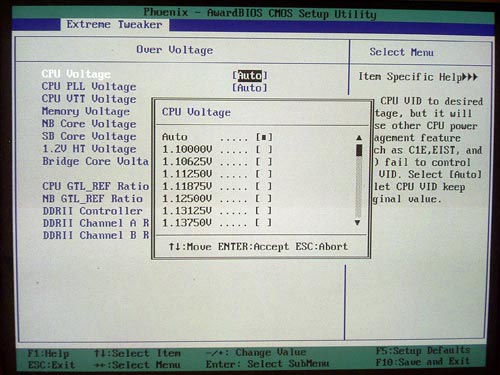
The adjustment range is within 6 to 50 in 1 increments. The next feature allows adjusting voltage on the CPU (Vcore) within 1.1V to 2.4V in 0.00625-0.025V increments.
The next feature raises voltage on the memory modules:
The adjustment range for Vmem is extremely wide (within 1.8V to 3.4V in 0.02V increments)! Moreover, there are a few more settings to raise voltage on the memory controller:
(which can be done independently for each line).
There is also a couple of useful features for adjusting voltage on the chipset. The north bridge voltage adjustment range is within 1.2V to 3.0V in 0.02V increments:
The voltage adjustment range on the south bridge is is within 1.5V to 1.875V in 0.05V increments:
Then, ASUS Striker II allows adjusting voltage on the HyperTransport bus within 1.2V to 1.95V in 0.05V increments:
Besides, the overclocker can adjust voltage on the CPU VTT within 1.2V to 1.55V in 0.05V increments:
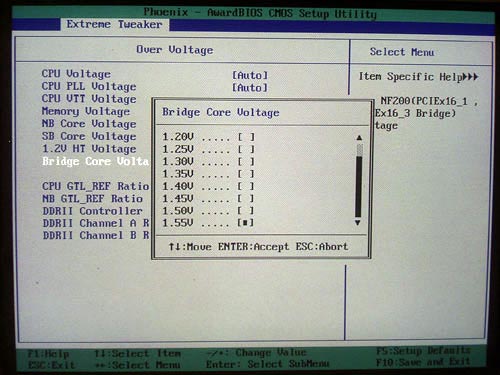
Finally, there is a feature for adjusting voltage on the nForce 200 bridge within 1.2V to 1.55V in 0.05V increments:
The board does not support the CPU dynamic overclocking feature ("NOS") which was implemented on the Striker model.
However, there is a feature for automatic setting of all the required parameters during overclocking to a fixed value (selection of overclocking rate is defined in percentage).
But overclocking from within Windows is done with the Ai Suite utility. In any case, the current version of the utility allows adjusting only the FSB speed.
Now on to the practical overclocking.
We used the most recent BIOS (902) firmware, tried various memory modules, and even replaced two PSUs. But in the end, the board failed to overcome the FSB = 400 MHz in the end. 400 MHz is not overclocking but the nominal frequency of Intel processors which are to be released in a few weeks. If we compare this result versus the other, we should note that MSI P7N Diamond also failed to overcome 400 MHz, and Gigabyte 780SLI-DS5 easily got over 500 MHz (524). That is, NVIDIA nForce 780i SLI is not to blame here (although we can't rule out its contribution) - engineers at ASUS should go on improving the overclocking tools.
In a couple of weeks, we have come back to tests of Striker II and tried the fresh BIOS (1101) version. But we found not substantial increase in the overclocking results.
 |
Content: |
 |
|
|
Top Stories: |
|
 |
|
MoBo:
|
|
|
|
VGA Card:
|
|
|
|
CPU & Memory:
|
|
|