Gigabyte X38-DQ6 (Intel X38)
Author:
Date: 02.10.2007 |
|
Expansion options
Gigabyte X38-DQ6 uses the south bridge ICH9R with a radiator. Therefore, the board supports six SerialATA II ports (yellow connectors) and allows merging hard disks into RAID arrays of levels 0,1,5, and 10 (MatrixRAID).
Besides, two more SerialATA II devices can be plugged in to the Gigabyte SATA2 controller (a JMB363 chip made by JMicron). The same chip provides support for an additional ParallelATA line.
matching connectors colored lilac
Therefore, as many as 10 hard disks (8 SATA + 2 PATA) altogether can be plugged in to Gigabyte X38-DQ6.
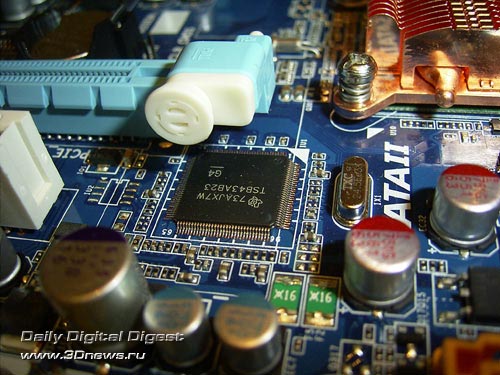
There are twelve USB2.0 ports onboard. Eight of them are on the rear panel, with 4 more plugged in via brackets (missing in the bundle). Besides, the motherboard supports the IEEE1394 ("Firewire"). For that, there is a Texas Instruments' TSB43AB23 controller onboard.
Therefore, the board offers support for 3 Firewire ports: one mounted on the rear panel, with the other one connected with a plate (missing in the package bundle).
Then, Gigabyte X38-DQ6 offers 8-channel Intel High Definition Audio, with ALC889A used as the codec.
A few words on the network support: the board uses two high-speed LAN controllers: Realtek RTL8111B (Gigabit Ethernet):
The board's rear panel is of original configuration.
Above all, we first note the lack of LPT- and COM-ports which are implemented with a bracket (missing in the bundle). On the other hand, there are eight (!) USB2.0 ports on the rear panel, two Firewire (of two types) ports, as well as optical and coaxial SPDIF-outputs.
Here is the traditional layout of the board:
Gigabyte X38-DQ6 completely lacks any jumpers, and to reset the CMOS settings a 2-pin CLR_CMOS connector positioned near the battery is used.
Now on to the BIOS settings.
 |
Content: |
 |
|
|
Top Stories: |
|
 |
|
MoBo:
|
|
|
|
VGA Card:
|
|
|
|
CPU & Memory:
|
|
|